Quick Start
Create the project
cargo new --lib <your_project_name>
Setup your files
Edit cargo.toml as follows:
[package]
name = "<your_project_name>"
version = "0.1.0"
edition = "2024"

[lib]
crate-type = ["cdylib"]

[dependencies]
engine = { git = "https://github.com/bloopgames/bloop-rs.git", tag = "0.0.22" }

[build-dependencies]
module-codegen = { git = "https://github.com/bloopgames/bloop-rs.git", tag = "0.0.22" }
Add a new file in src, build.rs:
use module_codegen::FfiBuilder;

fn main() {
    FfiBuilder::new().write();
}
Edit lib.rs:
use engine::prelude::*;

#[system_once]
fn hello() {
log::info!("hello!");
}

mod ffi {
use super::\*;
include!(env!("ECS_GENERATED_PATH"));
}
Download the bloop engine binary for your platform
https://github.com/bloopgames/bloop-rs/releases
Run the game
./bloop -g <path_to_your_project_dir>
Minimal Sample
This guide shows how to create a small but functional game module.
Create the project
See Quick Start.
Add a spawn system
First thing's first, let's spawn something.
Spawn a square
To do this, we can use a system_once, which is a function which runs only once at startup.
use engine::prelude::*;

#[system_once]
fn spawn_square() {
    let color_render = &ColorRender {
        size: Vec2::new(100., 100.),
        visible: true,
    };

    Engine::spawn(bundle!(color_render));
}

mod ffi {
    use super::*;
    include!(env!("ECS_GENERATED_PATH"));
}
To spawn an entity, we call the engine's Engine::spawn() function. This function takes a slice of ComponentRef structs. These are a bit difficult to construct manually, so we use the bundle!() macro to help generate this slice from regular references.
bundle!() can take references to any type of component. Here, ColorRender is a component which tells the renderer to draw this entity as a solid-colored rectangle.
💡 Tip
To see the square, run the game with
./bloop -g <path_to_your_project_dir>
Make the square a different color
By default, ColorRender draws a white rectangle. This is because the Color component is being automatically added for us, with a default value of Color::WHITE.
Let's add the Color component ourselves, rather than relying on the default.
use engine::prelude::*;

#[system_once]
fn spawn_square() {
    let color_render = &ColorRender {
        size: Vec2::new(100., 100.),
        visible: true,
    };

    let color = &Color::GREEN;

    Engine::spawn(bundle!(color_render, color));
}

mod ffi {
    use super::*;
    include!(env!("ECS_GENERATED_PATH"));
}
Now we have a green square!
Move the square
💡 Tip
While hot-reloading
system_oncefunctions is currently unsupported, hot reloading regularsystemfunctions is! Try coding this section while the game is running.
We now have a square, but it doesn't do much. Let's try moving it with WASD.
Add a new function, this time with #[system]. This type of system runs once per frame.
use engine::prelude::*;

#[system_once]
fn spawn_square() { /** snip */ }

#[system]
fn move_square() {}

mod ffi {
    use super::*;
    include!(env!("ECS_GENERATED_PATH"));
}
User input is accessible in a resource called InputState. To get access to a resource, simply add it as a system parameter wrapped in a Ref<T> (for immutable access) or Mut<T> (for mutable access).
#[system]
fn move_square(input: Ref<InputState>) {}
We also need access to our square entity. Unlike resources, we access entities via queries. A query takes a list of components (also wrapped in Ref<T> or Mut<T>), which it uses as a filter to match all entities in the world.
#[system]
fn move_square(input: Ref<InputState>, mut squares: Query<Mut<Transform>>) {}
Just like the Color component, a Transform component is implicitly added to any entity which adds a ColorRender component. Because our square entity is the only entity in the world which has a Transform component, we can simply query over the Transform component.
Now that our system inputs are set up, let's make it move!
#[system]
fn move_sphere(input: Ref<InputState>, mut spheres: Query<Mut<Transform>>) {
    spheres.for_each(|mut transform| {
        if input.keys[KeyCode::KeyW].pressed() {
            transform.position.y += 1.;
        }

        if input.keys[KeyCode::KeyS].pressed() {
            transform.position.y -= 1.;
        }

        if input.keys[KeyCode::KeyD].pressed() {
            transform.position.x += 1.;
        }

        if input.keys[KeyCode::KeyA].pressed() {
            transform.position.x -= 1.;
        }
    });
}
Build Your First Game With bloop
If you just want to get started and go wild, you can just build the Minimal Sample. However, if you learn better with structured guidance, this guide will take you from an empty project to a finished game comparable in scope to Bungeon in the Oven which was also made using Bloop.
There will be repeated information here as well in the minimal sample and reference. In this guide, we'll make sure you understand why things work the way they do and leave you with a great understanding of how to structure a game using an Entity Component System (ECS) framework. This does not serve as a tool for teaching Rust on its own and some familiarity will be assumed, but using Bloop successfully does not require advanced Rust skills.
Getting Started
Follow the Quick Start guide to get your project set up. For organization's sake, let's break out FFI into a separate Rust file in the src directory, call it ffi.rs:
use super::*;

include!(env!("ECS_GENERATED_PATH"));
Then we can clean up lib.rs to be a little nicer:
use engine::prelude::*;
mod ffi;

#[system_once]
fn hello() {
log::info!("hello!");
}
Once you've done that, let's have a brief chat about systems and introduce our first major ECS concept.
Systems_Once
Okay if you actually followed the previous page, then you should have an lib.rs that looks like this:
use engine::prelude::*;
mod ffi;

#[system_once]
fn hello() {
    log::info!("hello!");
}
The astute among you will notice the big ol' attribute macro #[system_once] before our hello function, and may even connect it to the title of this page! If you did not notice that, then you may need more coffee or to familiarize yourself more with Rust before continuing on.
Putting the S in ECS
In an ECS framework, the system is the thing that actually manipulates entities and their components. In Bloop, they're also your entry point to your game. If you ran your game as is currently with the command ./bloop -g <path_to_your_project_dir>, then you probably saw it output hello! in the log. That's because every system in lib.rs runs automatically, in order, from top to bottom.
You hopefully only saw one hello! output from your game. That's because the hello function is a system_once, meaning it runs only one time. What would happen if you changed it to #[system] instead?
hello!
hello!
hello!
hello!
hello!
hello!
hello!
hello!
hello!
hello!
hello!
hello!
hello!
hello!
hello!
hello!
hello!
hello!
hello!
hello!
hello!
hello!
hello!
hello!
hello!
hello!
hello!
hello!
hello!
hello!
hello!
hello!
hello!
hello!
hello!
hello!
hello!
hello!
hello!
hello!
hello!
hello!
hello!
hello!
hello!
hello!
hello!
hello!
hello!
hello!
hello!
hello!
hello!
hello!
hello!
hello!
hello!
hello!
hello!
hello!
hello!
hello!
hello!
hello!
hello!
That's right, if a system is just tagged with #[system] it runs every frame.
I for one, am sick of seeing that word, so I'm changing my lib.rs to look like this before we hop to the next page, and I recommend you do too:
use engine::prelude::*;
mod ffi;
Ah, beautiful silence. Let's now get to work and spawn something!
Spawn Something
To have anything in your game that actually exists and does things, you need an Entity. Entities are simply an index that you can assign various components to, which are the basic bits of data we need to describe the entity.
For instance, let's create a function to spawn a player character.
One thing we need to know is where the player is in the environment? We use the built-in Transform component:
fn spawn_player() {
      let transform = &Transform::default();
}
We don't have to define anything further than that, but you may very well want to be more explicit with how you spawn them:
let transform = &Transform{
    position: Vec2::new(50.0, -20.0), // Where in the world the transform is.
    scale: Vec2::splat(1.), // Change the size of the entity and everything on it.
    skew: Vec2::ZERO, // Skew the entity
    pivot: Vec2::ZERO, // Change the rotation pivot point.
    rotation: 2.0, // Rotation of the object (in radians?)
    layer: 10.0 // What order for rendering - higher shows up in front of lower.
    _padding: ?? // what is this for
}
You don't need to be so verbose, though, you can just specify what you want to actually change:
let transform = &Transform{
    layer: 10.,
    ..Default::default()
}
Every Transform component comes with a Color component automatically, as well. You can change it if you'd like:
fn spawn_player() {

    let transform = &Transform{
        layer: 10.,
        ..Default::default()
    };

    let color = &Color::ORANGE;
}
Now you have the concept of a player - something that gets rendered on layer 10 and is orange, but how do we add it to the world? We bundle those components together and tell the engine to spawn them, it's as simple as:
Engine::spawn(bundle!(transform, color));
So putting that all together, let's put this into our lib.rs, don't forget to add the #[system_once] macro to it and we should see our orange entity, right?
use engine::prelude::*;
mod ffi;

#[system_once]
fn spawn_player() {

    let transform = &Transform{
        layer: 10.,
        ..Default::default()
    };

    let color = &Color::ORANGE;


    Engine::spawn(bundle!(transform, color));
}
Go ahead and run your game and get excited to see... nothing.
What we've written only puts an entity in the world at layer 10 with the concept of the color orange attached to it. In order to see our entity, we need to add some kind of render component.
Render Something
You have a variety of ways to render something to the screen. Let's explore our options.
Color Render
The simplest way to see something, as quickly as possible, is to give it the ColorRender component, which renders a rectangle of the entity's color to the screen. If you don't specify a color, it'll be white.
let color_render = &ColorRender{
    size: Vec2::splat(100.), // This gets further multiplied by the Transform's scale!
    visible: true,
};
So now if we want to see an orange square player, we can add this in and finally see something in our game.
💡 The ColorRender component gets its color from the entity's Color component.
use engine::prelude::*;
mod ffi;

#[system_once]
fn spawn_player() {

    let transform = &Transform{
        layer: 10.,
        ..Default::default()
    };

    let color = &Color::ORANGE;

    let color_render = &ColorRender{
    size: Vec2::splat(100.),
    visible: true,
    };

    Engine::spawn(bundle!(transform, color, color_render));
}
If everything goes to plan and you call this function, you get a nice orange square! Hurray, you made a player!

What if you want something more complex than a rectangle? Well, that's too bad.
Texture Render
Unless, of course, you use a TextureRender component instead. Note that in order to use this, you'll need to load a texture into a GPU Interface, which we'll cover in more detail down the line. In the meantime, if you have an "assets" folder in the root of your project, you can load a texture like so.
let texture_render = &TextureRender{
        texture_id: Some(gpu_interface.load_texture("doge_baker.png").into()), // The texture to use.
        uv_region: Rect::new(0.0, 0.0, 1.0, 1.0), // What UV Region of the texture to use.
        size_override: None, // As above, multiplies by transform scale
        visible: true,
}
If we take this image and place it in an assets folder in the directory's root, and transform our lib.rs as follows...

use engine::prelude::*;
mod ffi;

#[system_once]
fn spawn_player(mut gpu_interface: Mut<GpuInterface>) {

    let transform = &Transform {
        layer: 10.,
        scale: Vec2::splat(3.0), // It's a small image so I really want to see it.
        ..Default::default()
    };

    let color = &Color::ORANGE;

    let texture_render = &TextureRender {
        texture_id: Some(gpu_interface.load_texture("doge_baker.png").into()), // The texture to use.
        ..Default::default()
    };
    Engine::spawn(bundle!(transform, color, texture_render));
}
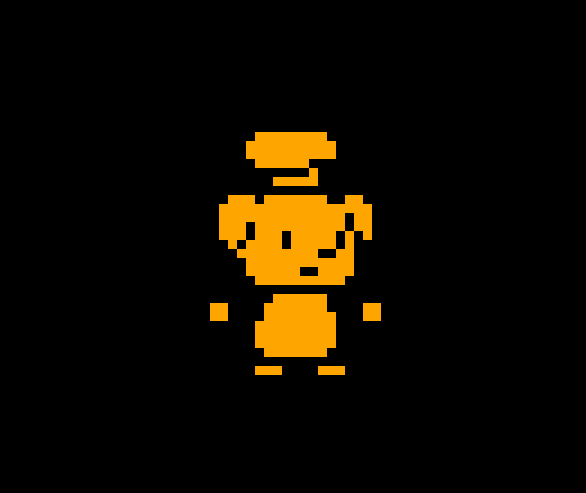
💡 Notice that the color we declared before is still getting applied! While our base image was just white, making this effect not that interesting, combining a Color component and a TextureRender component makes it easy to tint your sprites different colors.
Circle Render
The last basic type of rendering is the CircleRender component, which is a bit of a misnomer - it's a regular polygon render. In fact, if you want an orange square again, you can do this
use engine::prelude::*;
mod ffi;

#[system_once]
fn spawn_player() {

    let transform = &Transform{
        layer: 10.,
        scale: Vec2::splat(3.0),
        ..Default::default()
    };

    let color = &Color::ORANGE;

    let square_circle_render = &CircleRender {
        num_sides: 4,
        ..Default::default()
    };


    Engine::spawn(bundle!(transform, color, square_circle_render));
}
Voila, a square circle:
You can of course, make a triangle with three sides, or increase the number of sides high enough that it actually looks like a circle, or prevent anything from rendering at all by setting it to 2 or less sides!
What good is having an entity in the game if they can't move though? Well we're gonna have to learn about queries if we want to do that.
Queries: Systems, Twice
Our systems can work just great like normal functions as we've already seen, but what if you actually want to do something with an entity after you spawn it? That's where you need to use a Query. A Query takes a list of components and gives you back all entities who have those components. This is also where you specify how you want to access each component of that entity. Do you want to change something? Then it needs to be Mut<T>. If you only want to reference the component, then Ref<T> is the way to go. If you want to mutate any of the components of your Query, then you must also make the Query mut.
For right now we are only spawning one entity. That makes it very easy to query.
use engine::prelude::*;
mod ffi;

#[system_once]
fn spawn_player() {
    let transform = &Transform {
        position: Vec2::new(110., 0.),
        scale: Vec2::splat(3.0),
        ..Default::default()
    };
    let color = &Color::ORANGE;
    let circle_render = &CircleRender {
        num_sides: 20,
        ..Default::default()
    };
    Engine::spawn(bundle!(transform, color, circle_render));
}

#[system]
fn move_player(mut player: Query<Mut<Transform>>) {
    player.for_each(|mut transform| {
        if (transform.position.x >= 100.) {
            transform.position.y += 5.0;
        } else if (transform.position.x <= -100.) {
            transform.position.y -= 5.0;
        }

        if (transform.position.y >= 100.) {
            transform.position.x -= 5.0;
        } else if (transform.position.y <= -100.) {
            transform.position.x += 5.0;
        }
    });
}

Here you can see we've added a new system, queried our player, and we get this beautiful result:
Now, using what we know, I want to add an enemy to the game! Let's add a system in, maybe change up the colors to differentiate them...
use engine::prelude::*;
mod ffi;

#[system_once]
fn spawn_player() {
    let transform = &Transform {
        position: Vec2::new(110., 0.),
        scale: Vec2::splat(3.0),
        ..Default::default()
    };
    let color = &Color::new(0.96, 0.65, 0.14, 0.9);
    let circle_render = &CircleRender {
        num_sides: 20,
        ..Default::default()
    };
    Engine::spawn(bundle!(transform, color, circle_render));
}

#[system_once]
fn spawn_enemy() {
    let transform = &Transform {
        position: Vec2::new(-110., 0.),
        scale: Vec2::splat(3.0),
        ..Default::default()
    };
    let color = &Color::new(0.2, 0.2, 0.9, 0.9);
    let circle_render = &CircleRender {
        num_sides: 20,
        ..Default::default()
    };
    Engine::spawn(bundle!(transform, color, circle_render));
}

#[system]
fn move_player(mut player: Query<Mut<Transform>>) {
    player.for_each(|mut transform| {
        if (transform.position.x >= 100.) {
            transform.position.y += 5.0;
        } else if (transform.position.x <= -100.) {
            transform.position.y -= 5.0;
        }

        if (transform.position.y >= 100.) {
            transform.position.x -= 5.0;
        } else if (transform.position.y <= -100.) {
            transform.position.x += 5.0;
        }
    });
}

Oh my gosh! What a surprise! They're both moving?
Who could have predicted this?
Queries don't care that you think of them as different things, or call for a player, they'll grab every entity that has the required components. No, if we want to differentiate two very similar entities from each other, we're going to need to learn how to make our own custom components.
Custom Components
So far we've only been using builtin components like Transform, CircleRender, and Color. But to make a game, we need so much more power!
Luckily, defining components is essentially just another attribute macro, #[component]. A component is a Struct or enum and must be serializable and implement the Copy trait. More importantly, they require a dependency we haven't added to our cargo.toml file yet. We must add serde to our dependencies.
[package]
name = "<your_project_name>"
version = "0.1.0"
edition = "2024"

[lib]
crate-type = ["cdylib"]

[dependencies]
engine = { git = "https://github.com/bloopgames/bloop-rs.git", tag = "0.0.22" }
serde = "1.0.219"

[build-dependencies]
module-codegen = { git = "https://github.com/bloopgames/bloop-rs.git", tag = "0.0.22" }
Doing that should do the trick. You should then run cargo clean and cargo build in your project's root directory to make sure serde is properly integrated and that the macro gets compiled correctly.
Defining a Component
It's very easy to define a component.
#[component]
struct SomeComponent;
There, we did it! A component with no data is also known as a tag component, which can be very convenient as we'll see in a minute.
Of course, you may want data in your component, which is simple as well:
#[component]
struct Health{
    current_health: f32,
    max_health: f32,
}
Solving our Made Up Problem
In our previous step we pretended to "accidentally" move both the player and the enemy with the same system, and now want to differentiate between the two. The simplest way is to create a Player tag component.
#[component]
struct Player;
Add it to our player_spawn function:
Engine::spawn(bundle!(transform, color, circle_render, &Player));
And make our query also query for it:
#[system]
fn move_player(mut player: Query<(Mut<Transform>, Ref<Player>)>) {
    player.for_each(|(mut transform, _)| { // <- Note we use an underscore instead of "player" because we don't actually care about reading or manipulating that component.
        //....
    });
}
When you put it all together, it looks like so:
use engine::prelude::*;
mod ffi;

#[component]
struct Player;

#[system_once]
fn spawn_player() {
    let transform = &Transform {
        position: Vec2::new(110., 0.),
        scale: Vec2::splat(3.0),
        ..Default::default()
    };
    let color = &Color::new(0.96, 0.65, 0.14, 0.9);
    let circle_render = &CircleRender {
        num_sides: 20,
        ..Default::default()
    };
    Engine::spawn(bundle!(transform, color, circle_render, &Player));
}

#[system_once]
fn spawn_enemy() {
    let transform = &Transform {
        position: Vec2::new(-110., 0.),
        scale: Vec2::splat(3.0),
        ..Default::default()
    };
    let color = &Color::new(0.2, 0.2, 0.9, 0.9);
    let circle_render = &CircleRender {
        num_sides: 20,
        ..Default::default()
    };
    Engine::spawn(bundle!(transform, color, circle_render));
}

#[system]
fn move_player(mut player: Query<(Mut<Transform>, Ref<Player>)>) {
    player.for_each(|(mut transform, _)| {
        if (transform.position.x >= 100.) {
            transform.position.y += 5.0;
        } else if (transform.position.x <= -100.) {
            transform.position.y -= 5.0;
        }

        if (transform.position.y >= 100.) {
            transform.position.x -= 5.0;
        } else if (transform.position.y <= -100.) {
            transform.position.x += 5.0;
        }
    });
}
You'll have to run the code yourself to verify that only the player's orange circle moves! But we have no time to waste, we gotta learn about Resources, the final ECS concept, if we want to actually control our character!
Resources - the Power of Global State
Resources are a bit like components, in that they're also a Struct or enum that you define. Unlike components, only one of them exists at any given time, and you can access it in a system mutably with Mut<T> or as a reference with Ref<T>. When declaring your own, you also must #[derive(Default)] so that it can be initialized when the game starts. Effectively, resources are like components that apply to your entire game instance, instead of to a specific entity.
If, for some reason, you wanted your own global Time resource you can pass to systems, you could define it like so:
#[derive(Default)]
#[resource]
struct Time {
    time: f32,
}
I don't know why you would, but you could!
For our purposes, though, we want to use some of the powerful builtin resources. Well, one in particular, InputState. We'll need to get you the actual documentation for it but the short form is this is how you access what kind of inputs are being pressed/sent to the game via your player.
If we want to move our player ourselves, we just need to adjust our move_player function to actually care about the InputState. So let's make that change to lib.rs
#[system]
fn move_player(mut player: Query<(Mut<Transform>, Ref<Player>)>, input: Ref<InputState>) {
    player.for_each(|(mut transform, _)| {
        if input.keys[KeyCode::KeyW].pressed() {
            transform.position.y += 5.;
        }

        if input.keys[KeyCode::KeyS].pressed() {
            transform.position.y -= 5.;
        }

        if input.keys[KeyCode::KeyD].pressed() {
            transform.position.x += 5.;
        }

        if input.keys[KeyCode::KeyA].pressed() {
            transform.position.x -= 5.;
        }
    });
}
💡 If you read the Minimal Sample then this probably looks familiar to you...
If we now run our game with this system, we can actually move our orange circle around! Hurray!
Next we'll get to Part 2 and actually start making a game, not just covering the basics.
Player Control
Where we last left things, we had a game. An awful feeling game.
In this part we will:
- Fix the Movement Controls
- Add Acceleration and Velocity
- Add a Camera
- Aim Towards the Mouse
- Fire a Projectile
NOTE
From here on out my current lib.rs and other files will only be shown in full at the end of each page, instead of several times throughout. If we're editing it, the code block will still clearly be marked. You'll need to find where to change on your own.
Fix the Movement Controls
Our movement system broke some of the cardinal rules of making a game. First and foremost, it did nothing to normalize movement on the diagonals. Letting the players cover twice as much ground moving diagonally is a classic early game dev mistake. This is easily solvable with glam, the library we use for our linear algebra, but will require a change to our input logic.
For a refresher here is our current code:
#[system]
fn move_player(mut player: Query<(Mut<Transform>, Ref<Player>)>, input: Ref<InputState>) {
    player.for_each(|(mut transform, _)| {
        if input.keys[KeyCode::KeyW].pressed() {
            transform.position.y += 5.;
        }

        if input.keys[KeyCode::KeyS].pressed() {
            transform.position.y -= 5.;
        }

        if input.keys[KeyCode::KeyD].pressed() {
            transform.position.x += 5.;
        }

        if input.keys[KeyCode::KeyA].pressed() {
            transform.position.x -= 5.;
        }
    });
}
We're actually concerned more about the individual axes of movement, vertical and horizontal, and can represent that as a Vec2. That then allows us to normalize the magnitude of the vector, preventing the player from getting extra movement by going diagonally. Rather than directly translate "is this button pressed this frame?" to "move in that direction," we want to abstract this a level so that our movement and input aren't as tightly coupled.
There's several ways to do this, but we're going for an easy and fairly comprehensive solution: add a PlayerInput resource to capture the input data the way we want to use it.
Let's first define this resource...
#[derive(Default)]
#[resource]
struct PlayerInput {
    move_axes: Vec2,
}
We'll expand on it later, but that's enough for now. Now we need a system to convert the InputState raw input data into our new resource. We should put this first in our order of systems, so that we can have up to date input data at the start of every frame.
#[system]
fn update_player_input(mut player_input: Mut<PlayerInput>, input: Ref<InputState>) {
    let key_to_f32 = |key_code| {
        if input.keys[key_code].pressed() {
            1.0
        } else {
            0.0
        }
    };

    player_input.move_axes = Vec2::new(
        key_to_f32(KeyCode::KeyD) - key_to_f32(KeyCode::KeyA),
        key_to_f32(KeyCode::KeyW) - key_to_f32(KeyCode::KeyS),
    )
    .clamp_length_max(1.);
}
Because checking if a key_code is pressed returns a bool and Rust can't automatically turn that into an f32, we need to convert it instead. Rather than create a whole new util.rs file or something else, we'll just keep it inline for now. There's still one major flaw here: hardcoded input bindings. For now, we're going to accept it. But in a future chapter we'll address it.
We need to update our move_player function to use the new PlayerInput resource.
#[system]
fn move_player(mut player: Query<(Mut<Transform>, Ref<Player>)>, input: Ref<PlayerInput>) {
    player.for_each(|(mut transform, _)| {
        transform.position += input.move_axes;
    });
}
If we were to run this now though, our player will be much slower than before. We could simply multiply by our (arbitrary) old value of 5.0. However, if there is any variance in the amount of time each frame takes to process, the player will move at an uneven pace. We need to introduce another built-in resource, FrameConstants, to get the amount of time that has passed between frames. Because the amount of time is so tiny, our player will barely move at all. So at the same time we're going to add a const to the top of the file called PLAYER_MOVE_SPEED to make it easy to adjust in the future.
const PLAYER_MOVE_SPEED = 250.;

// ...

#[system]
fn move_player(
    mut player: Query<(Mut<Transform>, Ref<Player>)>,
    input: Ref<PlayerInput>,
    frame_constants: Ref<FrameConstants>,
) {
    player.for_each(|(mut transform, _)| {
        transform.position += input.move_axes * PLAYER_MOVE_SPEED * frame_constants.delta_time;
    });
}
I've also reduced the scaling of the player and enemy to use sizes closer to our final plan for the game. So with lib.rs looking like the following, we finally have player movement that feels okay.
use engine::prelude::*;
mod ffi;

const PLAYER_MOVE_SPEED: f32 = 250.;

#[derive(Default)]
#[resource]
struct PlayerInput {
    move_axes: Vec2,
}

#[component]
struct Player;

#[system]
fn update_player_input(mut player_input: Mut<PlayerInput>, input: Ref<InputState>) {
    let key_to_f32 = |key_code| {
        if input.keys[key_code].pressed() {
            1.0
        } else {
            0.0
        }
    };

    player_input.move_axes = Vec2::new(
        key_to_f32(KeyCode::KeyD) - key_to_f32(KeyCode::KeyA),
        key_to_f32(KeyCode::KeyW) - key_to_f32(KeyCode::KeyS),
    )
    .clamp_length_max(1.);
}

#[system_once]
fn spawn_players() {
    let transform = &Transform {
        position: Vec2::new(110., 0.),
        scale: Vec2::splat(1.5),
        ..Default::default()
    };
    let color = &Color::new(0.96, 0.65, 0.14, 0.9);
    let circle_render = &CircleRender {
        num_sides: 20,
        ..Default::default()
    };
    Engine::spawn(bundle!(transform, color, circle_render, &Player));
}

#[system_once]
fn spawn_enemy() {
    let transform = &Transform {
        position: Vec2::new(-110., 0.),
        scale: Vec2::splat(1.5),
        ..Default::default()
    };
    let color = &Color::new(0.2, 0.2, 0.9, 0.9);
    let circle_render = &CircleRender {
        num_sides: 20,
        ..Default::default()
    };
    Engine::spawn(bundle!(transform, color, circle_render));
}

#[system]
fn move_player(
    mut player: Query<(Mut<Transform>, Ref<Player>)>,
    input: Ref<PlayerInput>,
    frame_constants: Ref<FrameConstants>,
) {
    player.for_each(|(mut transform, _)| {
        transform.position += input.move_axes * PLAYER_MOVE_SPEED * frame_constants.delta_time;
    });
}
Of course, I don't want to settle for movement that just feels "okay." I want the movement to feel great, which we'll need acceleration and velocity to accomplish.
Add Acceleration and Velocity
Games tend to feel much more natural and have some ephemeral "quality" to them if they use acceleration and velocity for movement instead of directly moving at maximum speed all the time. For some precision genres like super precise platformers and bullet hell games, it's actually better to just use direct movement. Even those games will benefit from this infrastructure being in place and, I'd argue, can still feel better with just a little bit of momentum added.
The Velocity Component
We're going to want to move a lot of different things in our game. It's time to decouple movement from the player. For anything we want to move, we'll add a Velocity component and an apply_velocity system that uses it. This way we can have a system that just takes anything that has some kind of speed and moves it. We're deriving Default here so that we can assign it more easily in the future without having to specify our current_velocity is 0 every time we want to add this to an entity.
#[derive(Default)]
#[component]
struct Velocity {
    current_velocity: Vec2,
    max_velocity: f32,
}


#[system]
fn apply_velocity(
    mut entities_to_move: Query<(Mut<Transform>, Ref<Velocity>)>,
    frame_constants: Ref<FrameConstants>,
) {
    entities_to_move.for_each(|(mut transform, velocity)| {
        transform.position += velocity.current_velocity * frame_constants.delta_time;
    });
}
The Acceleration Component
A bullet fired from a gun likely doesn't need acceleration (for the type of game we're making). Our player, and likely our enemies, do. That's why we create these as separate components and systems. Note that to work as intended, our acceleration system must come before our velocity one. We want a separate acceleration and deceleration amount for maximum control. We'll also be calculating a target_velocity to know whether we're trying to stop or not, which will change the behavior slightly. Lastly we need a ZERO_VELOCITY_THRESHOLD for when we can safely round a velocity down to zero, making sure that things actually stop moving when they're supposed to.
const ZERO_VELOCITY_THRESHOLD: f32 = 0.1; // You can change this!

#[derive(Default)]
#[component]
struct Acceleration {
    acceleration_rate: f32,
    deceleration_rate: f32,
    target_velocity: Vec2,
}

#[system]
fn apply_aceleration(
    mut velocities_to_adjust: Query<(Ref<Acceleration>, Mut<Velocity>)>,
    frame_constants: Ref<FrameConstants>,
) {
    velocities_to_adjust.for_each(|(acceleration, mut velocity)| {
        // Calculate the difference between current and target velocity
        let velocity_delta = acceleration.target_velocity - velocity.current_velocity;

        // Determine if we're decelerating, if we're trying to get to no velocity
        // or if our target velocity is opposite our current.
        let is_decelerating = acceleration.target_velocity == Vec2::ZERO
            || acceleration.target_velocity.dot(velocity.current_velocity) < 0.0;

        let rate = if is_decelerating {
            acceleration.deceleration_rate
        } else {
            acceleration.acceleration_rate
        };

        // Calculate the maximum change allowed this frame
        let max_change = rate * frame_constants.delta_time;

        // Apply the change, clamped to the maximum rate
        let velocity_change = velocity_delta.clamp_length_max(max_change);
        velocity.current_velocity += velocity_change;

        // Check if we're trying to stop on each axis.
        if acceleration.target_velocity.x.abs() < DONE_MOVING_THRESHOLD
            && velocity.current_velocity.x.abs() < DONE_MOVING_THRESHOLD
        {
            velocity.current_velocity.x = 0.;
        }
        if acceleration.target_velocity.y.abs() < DONE_MOVING_THRESHOLD
            && velocity.current_velocity.y.abs() < DONE_MOVING_THRESHOLD
        {
            velocity.current_velocity.y = 0.;
        }

        // Clamp to max velocity
        velocity.current_velocity = velocity
            .current_velocity
            .clamp_length_max(velocity.max_velocity);

    });
}
Applying to Our Player
We'll need some more config values for our player to have things work as intended. For consistency we'll change PLAYER_MOVE_SPEED to PLAYER_MAX_VELOCITY. In addition, we'll have to spawn our player with Velocity and Acceleration components, and add a new system to apply them, replacing our old move_player system that is now no longer necessary.
const PLAYER_MAX_VELOCITY: f32 = 750.;
const PLAYER_ACCELERATION: f32 = 9000.;
const PLAYER_DECELERATION: f32 = 12000.;

#[system_once]
fn spawn_player() {
    let transform = &Transform {
        position: Vec2::new(110., 0.),
        scale: Vec2::splat(1.5),
        ..Default::default()
    };
    let color = &Color::new(0.96, 0.65, 0.14, 0.9);
    let circle_render = &CircleRender {
        num_sides: 20,
        ..Default::default()
    };

    let velocity = &Velocity {
        max_velocity: PLAYER_MAX_VELOCITY,
        ..Default::default()
    };
    let acceleration = &Acceleration {
        acceleration_rate: PLAYER_ACCELERATION,
        deceleration_rate: PLAYER_DECELERATION,
        ..Default::default()
    };


    Engine::spawn(bundle!(
        transform,
        color,
        circle_render,
        &Player,
        velocity,
        acceleration
    ));
}


#[system]
fn update_player_acceleration(
    player_input: Ref<PlayerInput>,
    mut player_query: Query<(Mut<Acceleration>, Ref<Velocity>, Ref<Player>)>,
) {
    let Some((mut acceleration, velocity, _)) = player_query.get_mut(0) else {
        return;
    };

    acceleration.target_velocity = player_input.move_axes * velocity.max_velocity;
}
The let Some(... unpacks the query into more easily referenceable parts.
If you've applied all the above changes, you should have a character that moves around with just a tiny bit more polished feeling than if we hadn't done this.
Dial in your Movement Values
You may dislike some of the consts and want to tweak them. With Bloop's hot module reloading, that should be super simple to test, but since we're assigning those consts at spawn they don't automatically sync when you add them. You may wish to add this system to make things automatically sync for you.
#[system]
fn sync_player_movement_to_config_consts(
    mut player: Query<(Mut<Acceleration>, Mut<Velocity>, Ref<Player>)>,
) {
    let Some((mut acceleration, mut velocity, _)) = player.get_mut(0) else {
        return;
    };
    velocity.max_velocity = PLAYER_MAX_VELOCITY;
    acceleration.acceleration_rate = PLAYER_ACCELERATION;
    acceleration.deceleration_rate = PLAYER_DECELERATION;
}
I recommend trying to dance around the blue enemy as best as you can, and if you feel like you can precisely run circles around it without touching it while the movement still has just the tiniest bit of ebb and flow - which, for me, the supplied values provide - then you can rest easily. Don't be afraid to experiment, though! What happens if you make the decel rate very low? What about accel? Play around with the values and don't be afraid to mess them up, you can always undo it. If you'd like, join me as I give the enemy some simple AI as our first optional side quest, or move right along to adding a camera.
My current lib.rs:
use engine::prelude::*;
mod ffi;

const PLAYER_MAX_VELOCITY: f32 = 750.;
const PLAYER_ACCELERATION: f32 = 9000.;
const PLAYER_DECELERATION: f32 = 12000.;
const ZERO_VELOCITY_THRESHOLD: f32 = 0.1;

#[derive(Default)]
#[resource]
struct PlayerInput {
    move_axes: Vec2,
}

#[component]
struct Player;

#[derive(Default)]
#[component]
struct Velocity {
    current_velocity: Vec2,
    max_velocity: f32,
}

#[derive(Default)]
#[component]
struct Acceleration {
    acceleration_rate: f32,
    deceleration_rate: f32,
    target_velocity: Vec2,
}

#[system]
fn sync_player_movement_to_config_consts(
    mut player: Query<(Mut<Acceleration>, Mut<Velocity>, Ref<Player>)>,
) {
    let Some((mut acceleration, mut velocity, _)) = player.get_mut(0) else {
        return;
    };
    velocity.max_velocity = PLAYER_MAX_VELOCITY;
    acceleration.acceleration_rate = PLAYER_ACCELERATION;
    acceleration.deceleration_rate = PLAYER_DECELERATION;
}

#[system]
fn update_player_input(mut player_input: Mut<PlayerInput>, input: Ref<InputState>) {
    let key_to_f32 = |key_code| {
        if input.keys[key_code].pressed() {
            1.0
        } else {
            0.0
        }
    };

    player_input.move_axes = Vec2::new(
        key_to_f32(KeyCode::KeyD) - key_to_f32(KeyCode::KeyA),
        key_to_f32(KeyCode::KeyW) - key_to_f32(KeyCode::KeyS),
    )
    .clamp_length_max(1.);
}

#[system_once]
fn spawn_player() {
    let transform = &Transform {
        position: Vec2::new(110., 0.),
        scale: Vec2::splat(1.5),
        ..Default::default()
    };
    let color = &Color::new(0.96, 0.65, 0.14, 0.9);
    let circle_render = &CircleRender {
        num_sides: 20,
        ..Default::default()
    };

    let velocity = &Velocity {
        max_velocity: PLAYER_MAX_VELOCITY,
        ..Default::default()
    };
    let acceleration = &Acceleration {
        acceleration_rate: PLAYER_ACCELERATION,
        deceleration_rate: PLAYER_DECELERATION,
        ..Default::default()
    };

    Engine::spawn(bundle!(
        transform,
        color,
        circle_render,
        &Player,
        velocity,
        acceleration
    ));
}

#[system_once]
fn spawn_enemy() {
    let transform = &Transform {
        position: Vec2::new(-110., 0.),
        scale: Vec2::splat(1.5),
        ..Default::default()
    };
    let color = &Color::new(0.2, 0.2, 0.9, 0.9);
    let circle_render = &CircleRender {
        num_sides: 20,
        ..Default::default()
    };
    Engine::spawn(bundle!(transform, color, circle_render));
}

#[system]
fn update_player_acceleration(
    player_input: Ref<PlayerInput>,
    mut player_query: Query<(Mut<Acceleration>, Ref<Velocity>, Ref<Player>)>,
) {
    let Some((mut acceleration, velocity, _)) = player_query.get_mut(0) else {
        return;
    };

    acceleration.target_velocity = player_input.move_axes * velocity.max_velocity;
}

#[system]
fn apply_acceleration(
    mut velocities_to_adjust: Query<(Ref<Acceleration>, Mut<Velocity>)>,
    frame_constants: Ref<FrameConstants>,
) {
    velocities_to_adjust.for_each(|(acceleration, mut velocity)| {
        let velocity_delta = acceleration.target_velocity - velocity.current_velocity;

        let is_decelerating = acceleration.target_velocity == Vec2::ZERO
            || acceleration.target_velocity.dot(velocity.current_velocity) < 0.0;

        let rate = if is_decelerating {
            acceleration.deceleration_rate
        } else {
            acceleration.acceleration_rate
        };

        let max_change = rate * frame_constants.delta_time;

        let velocity_change = velocity_delta.clamp_length_max(max_change);
        velocity.current_velocity += velocity_change;

        if acceleration.target_velocity.x.abs() < ZERO_VELOCITY_THRESHOLD
            && velocity.current_velocity.x.abs() < ZERO_VELOCITY_THRESHOLD
        {
            velocity.current_velocity.x = 0.;
        }
        if acceleration.target_velocity.y.abs() < ZERO_VELOCITY_THRESHOLD
            && velocity.current_velocity.y.abs() < ZERO_VELOCITY_THRESHOLD
        {
            velocity.current_velocity.y = 0.;
        }

        velocity.current_velocity = velocity
            .current_velocity
            .clamp_length_max(velocity.max_velocity);
    });
}

#[system]
fn apply_velocity(
    mut entities_to_move: Query<(Mut<Transform>, Ref<Velocity>)>,
    frame_constants: Ref<FrameConstants>,
) {
    entities_to_move.for_each(|(mut transform, velocity)| {
        transform.position += velocity.current_velocity * frame_constants.delta_time;
    });
}
Yikes that's a long boy!
Sidequest 1: Basic Enemy AI
Now that we have our Velocity and Acceleration components, it's very easy to make our enemy do something. Of course, we want to specify they're an enemy, so we add a new tag component for it and update our enemy to spawn with it.
const ENEMY_MAX_VELOCITY: f32 = 100.;
const ENEMY_ACCELERATION: f32 = 1000.;
const ENEMY_DECELERATION: f32 = 1500.;

#[component]
struct Enemy;

#[system_once]
fn spawn_enemy() {
    let transform = &Transform {
        position: Vec2::new(-110., 0.),
        scale: Vec2::splat(1.5),
        ..Default::default()
    };
    let color = &Color::new(0.2, 0.2, 0.9, 0.9);
    let circle_render = &CircleRender {
        num_sides: 20,
        ..Default::default()
    };
    let velocity = &Velocity {
        max_velocity: ENEMY_MAX_VELOCITY,
        ..Default::default()
    };
    let acceleration = &Acceleration {
        acceleration_rate: ENEMY_ACCELERATION,
        deceleration_rate: ENEMY_DECELERATION,
        ..Default::default()
    };
    Engine::spawn(bundle!(
        transform,
        color,
        circle_render,
        &Enemy,
        velocity,
        acceleration
    ));
}
Now like any good enemy, ours should try to reach the player if they're within a certain range, and give up if the player gets too far away. But like many a good enemy, ours is shy and doesn't want to get too close to the object of their fixation, the player.
const ENEMY_CHASE_DISTANCE: f32 = 1000.;
const ENEMY_STOP_DISTANCE: f32 = 200.;


#[system]
fn update_enemy_acceleration(
    mut enemy_query: Query<(Mut<Acceleration>, Ref<Velocity>, Ref<Transform>, Ref<Enemy>)>,
    player_query: Query<(Ref<Transform>, Ref<Player>)>,
) {
    let Some((player_transform, _)) = player_query.get(0) else {
        return;
    };

    enemy_query.for_each(|(mut acceleration, velocity, transform, _)| {
        let to_player = player_transform.position - transform.position;
        let distance = to_player.length();

        if distance > ENEMY_CHASE_DISTANCE {
            acceleration.target_velocity = Vec2::ZERO;
        } else {
            let ideal_position =
                player_transform.position - to_player.normalize() * ENEMY_STOP_DISTANCE;

            let to_ideal = ideal_position - transform.position;
            let distance_to_ideal = to_ideal.length();

            if distance_to_ideal < 20.0 {
                acceleration.target_velocity = Vec2::ZERO;
            } else {
                let speed_factor = if distance_to_ideal < 50.0 { 0.5 } else { 1.0 };
                acceleration.target_velocity =
                    to_ideal.normalize_or_zero() * (velocity.max_velocity * speed_factor);
            }
        }
    });
}
There's some magic numbers in there that could/should be consts, but this is just a little toy for now anyway. Now when you run the game, your enemy will actually interact with you! That means we've actually made a game for the first time!
We can celebrate by doing more homework now: adding a camera.
Add a Camera
Now that our player can move, you probably discovered awfully quickly how easy it is for that little scamp to end up off the side of the screen. Well let's put those fears to rest and make a camera that intelligently follows the player instead!
Camera Component
Bloop has a builtin Camera component so it's actually pretty easy to integrate one. The component has a few fields that still are a bit of a work in progress but feel free to play around with them. We will revisit some later. The only one I'm interested in for now is clear_color, which lets you set effectively whatever color you want as the "background color" of your game. I happen to like #222 so I'm going to use that.
#[system_once]
fn spawn_camera() {
    let camera = &Camera {
        clear_color: Color::from_hex_str("#222").unwrap(),
        ..Default::default()
    };

    Engine::spawn(bundle!(&Transform::default(), camera));

}
This is all it takes to spawn a camera and have its view output to the game window's viewport.
So the only thing we need to do is make the camera follow the player. We only intend to have one camera, so again we can repeat patterns from our player related systems to ensure nothing funky happens. It's important we put this after apply_velocity, so that the camera properly responds to the player's movement.
#[system]
fn update_camera_position(
    mut camera_query: Query<(Mut<Transform>, Ref<Camera>)>,
    player_query: Query<(Ref<Transform>, Ref<Player>)>,
) {
    let Some((player_transform, _)) = player_query.get(0) else {
        return;
    };

    let Some((mut camera_transform, _)) = camera_query.get_mut(0) else {
        return;
    };

    camera_transform.position = player_transform.position;
}
If you load up and play now, you might not realize anything's changed until you move around a bit and realize the camera is staying locked on with the player dead in the center of the screen. But just above a grey endless plain (or whatever color you chose), it's easy to lose all sense of direction and scale. What we need is...
A Basic Environment
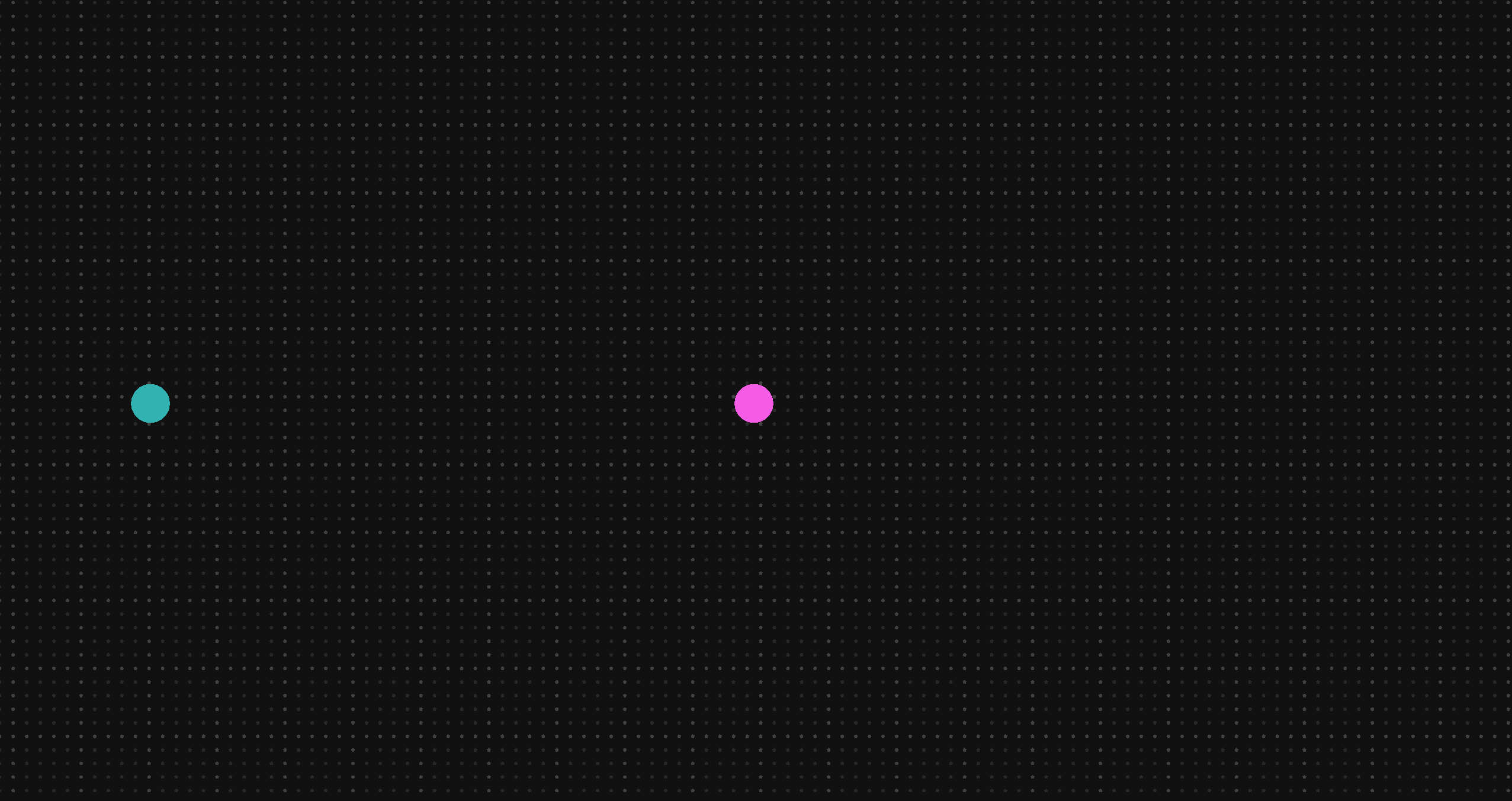
First we're going to spawn a grid of dots. I happen to be using pentagons for mine, but you could make them more rounded circles or whatever you want.
For my taste here's the consts I went with:
const GRID_DOT_SIZE: f32 = 7.5;
const GRID_DOT_SIDES: u32 = 5;
const GRID_DOT_SPACING: f32 = 25.;
const GRID_ROWS: u32 = 200;
const GRID_COLS: u32 = 200;
const GRID_DOT_ALPHA_1: f32 = 0.1;
const GRID_DOT_ALPHA_2: f32 = 0.2;
const GRID_DOT_ALPHA_SPACING: u32 = 5;
We have to do some annoying stuff due to Rust but basically the plan is to spawn a grid centered in the world where every nth dot is slightly brighter, lending a "graph paper" like effect.
#[system_once]
fn spawn_grid_dots() {
    let grid_width = (GRID_COLS - 1) as f32 * GRID_DOT_SPACING;
    let grid_height = (GRID_ROWS - 1) as f32 * GRID_DOT_SPACING;
    let start_x = -grid_width / 2.0;
    let start_y = -grid_height / 2.0;

    for row in 0..=GRID_ROWS {
        for col in 0..=GRID_COLS {
            let x = start_x + ((col) as f32 * GRID_DOT_SPACING);
            let y = start_y + ((row) as f32 * GRID_DOT_SPACING);

            let transform = &Transform {
                position: Vec2::new(x, y),
                scale: Vec2::splat(1.0),
                ..Default::default()
            };

            let is_grid_line =
                row % GRID_DOT_ALPHA_SPACING == 0 || col % GRID_DOT_ALPHA_SPACING == 0;
            let base_alpha = if is_grid_line {
                GRID_DOT_ALPHA_2
            } else {
                GRID_DOT_ALPHA_1
            };

            let color = &Color::new(1.0, 1.0, 1.0, base_alpha);

            let circle_render = &CircleRender {
                num_sides: GRID_DOT_SIDES,
                size: Vec2::splat(GRID_DOT_SIZE),
                visible: true,
            };
            Engine::spawn(bundle!(transform, color, circle_render));
        }
    }
}
You could, of course, tweak this to your hearts content, but you should end up with something like this:
Our lib.rs is getting a little long in the tooth so we're going to do a brief refactor, after which we can embark on a couple cool sidequests or just go on with the basics.
use engine::prelude::*;
mod ffi;

const PLAYER_MAX_VELOCITY: f32 = 750.;
const PLAYER_ACCELERATION: f32 = 9000.;
const PLAYER_DECELERATION: f32 = 12000.;
const ZERO_VELOCITY_THRESHOLD: f32 = 0.1;

const ENEMY_MAX_VELOCITY: f32 = 300.;
const ENEMY_ACCELERATION: f32 = 1000.;
const ENEMY_DECELERATION: f32 = 5000.;

const ENEMY_CHASE_DISTANCE: f32 = 1000.;
const ENEMY_STOP_DISTANCE: f32 = 200.;

const GRID_DOT_SIZE: f32 = 7.5;
const GRID_DOT_SIDES: u32 = 5;
const GRID_DOT_SPACING: f32 = 25.;
const GRID_ROWS: u32 = 200;
const GRID_COLS: u32 = 200;
const GRID_DOT_ALPHA_1: f32 = 0.1;
const GRID_DOT_ALPHA_2: f32 = 0.2;
const GRID_DOT_COLOR_SPACING: u32 = 5;

#[derive(Default)]
#[resource]
struct PlayerInput {
    move_axes: Vec2,
}

#[component]
struct Player;

#[component]
struct Enemy;

#[derive(Default)]
#[component]
struct Velocity {
    current_velocity: Vec2,
    max_velocity: f32,
}

#[derive(Default)]
#[component]
struct Acceleration {
    acceleration_rate: f32,
    deceleration_rate: f32,
    target_velocity: Vec2,
}

#[system_once]
fn spawn_grid_dots() {
    let grid_width = (GRID_COLS - 1) as f32 * GRID_DOT_SPACING;
    let grid_height = (GRID_ROWS - 1) as f32 * GRID_DOT_SPACING;
    let start_x = -grid_width / 2.0;
    let start_y = -grid_height / 2.0;

    for row in 0..=GRID_ROWS {
        for col in 0..=GRID_COLS {
            let x = start_x + ((col) as f32 * GRID_DOT_SPACING);
            let y = start_y + ((row) as f32 * GRID_DOT_SPACING);

            let transform = &Transform {
                position: Vec2::new(x, y),
                scale: Vec2::splat(1.0),
                ..Default::default()
            };

            let is_grid_line =
                row % GRID_DOT_ALPHA_SPACING == 0 || col % GRID_DOT_ALPHA_SPACING == 0;
            let base_alpha = if is_grid_line {
                GRID_DOT_ALPHA_2
            } else {
                GRID_DOT_ALPHA_1
            };

            let color = &Color::new(1.0, 1.0, 1.0, base_alpha);

            let circle_render = &CircleRender {
                num_sides: GRID_DOT_SIDES,
                size: Vec2::splat(GRID_DOT_SIZE),
                visible: true,
            };
            Engine::spawn(bundle!(transform, color, circle_render));
        }
    }
}

#[system]
fn sync_player_movement_to_config_consts(
    mut player: Query<(Mut<Acceleration>, Mut<Velocity>, Ref<Player>)>,
) {
    let Some((mut acceleration, mut velocity, _)) = player.get_mut(0) else {
        return;
    };
    velocity.max_velocity = PLAYER_MAX_VELOCITY;
    acceleration.acceleration_rate = PLAYER_ACCELERATION;
    acceleration.deceleration_rate = PLAYER_DECELERATION;
}

#[system]
fn update_player_input(mut player_input: Mut<PlayerInput>, input: Ref<InputState>) {
    let key_to_f32 = |key_code| {
        if input.keys[key_code].pressed() {
            1.0
        } else {
            0.0
        }
    };

    player_input.move_axes = Vec2::new(
        key_to_f32(KeyCode::KeyD) - key_to_f32(KeyCode::KeyA),
        key_to_f32(KeyCode::KeyW) - key_to_f32(KeyCode::KeyS),
    )
    .clamp_length_max(1.);
}

#[system_once]
fn spawn_player() {
    let transform = &Transform {
        position: Vec2::new(1000., 0.),
        scale: Vec2::splat(1.5),
        ..Default::default()
    };
    let color = &Color::new(0.96, 0.36, 0.9, 1.);
    let circle_render = &CircleRender {
        num_sides: 20,
        ..Default::default()
    };

    let velocity = &Velocity {
        max_velocity: PLAYER_MAX_VELOCITY,
        ..Default::default()
    };
    let acceleration = &Acceleration {
        acceleration_rate: PLAYER_ACCELERATION,
        deceleration_rate: PLAYER_DECELERATION,
        ..Default::default()
    };

    Engine::spawn(bundle!(
        transform,
        color,
        circle_render,
        &Player,
        velocity,
        acceleration
    ));
}

#[system_once]
fn spawn_camera() {
    let camera = &Camera {
        aspect: CameraAspect::FixedVirtualHeight { height: 1500. },
        clear_color: Color::from_hex_str("#222").unwrap(),
        ..Default::default()
    };

    Engine::spawn(bundle!(&Transform::default(), camera));
}

#[system_once]
fn spawn_enemy() {
    let transform = &Transform {
        position: Vec2::new(-110., 0.),
        scale: Vec2::splat(1.5),
        ..Default::default()
    };
    let color = &Color::new(0.2, 0.7, 0.7, 1.);
    let circle_render = &CircleRender {
        num_sides: 20,
        ..Default::default()
    };
    let velocity = &Velocity {
        max_velocity: ENEMY_MAX_VELOCITY,
        ..Default::default()
    };
    let acceleration = &Acceleration {
        acceleration_rate: ENEMY_ACCELERATION,
        deceleration_rate: ENEMY_DECELERATION,
        ..Default::default()
    };

    Engine::spawn(bundle!(
        transform,
        color,
        circle_render,
        &Enemy,
        velocity,
        acceleration
    ));
}

#[system]
fn update_player_acceleration(
    player_input: Ref<PlayerInput>,
    mut player_query: Query<(Mut<Acceleration>, Ref<Velocity>, Ref<Player>)>,
) {
    let Some((mut acceleration, velocity, _)) = player_query.get_mut(0) else {
        return;
    };

    acceleration.target_velocity = player_input.move_axes * velocity.max_velocity;
}

#[system]
fn update_enemy_acceleration(
    mut enemy_query: Query<(Mut<Acceleration>, Ref<Velocity>, Ref<Transform>, Ref<Enemy>)>,
    player_query: Query<(Ref<Transform>, Ref<Player>)>,
) {
    let Some((player_transform, _)) = player_query.get(0) else {
        return;
    };

    enemy_query.for_each(|(mut acceleration, velocity, transform, _)| {
        let to_player = player_transform.position - transform.position;
        let distance = to_player.length();

        if distance > ENEMY_CHASE_DISTANCE {
            acceleration.target_velocity = Vec2::ZERO;
        } else {
            let ideal_position =
                player_transform.position - to_player.normalize() * ENEMY_STOP_DISTANCE;

            let to_ideal = ideal_position - transform.position;
            let distance_to_ideal = to_ideal.length();

            if distance_to_ideal < 20.0 {
                acceleration.target_velocity = Vec2::ZERO;
            } else {
                let speed_factor = if distance_to_ideal < 50.0 { 0.5 } else { 1.0 };
                acceleration.target_velocity =
                    to_ideal.normalize_or_zero() * (velocity.max_velocity * speed_factor);
            }
        }
    });
}

#[system]
fn apply_acceleration(
    mut velocities_to_adjust: Query<(Ref<Acceleration>, Mut<Velocity>)>,
    frame_constants: Ref<FrameConstants>,
) {
    velocities_to_adjust.for_each(|(acceleration, mut velocity)| {
        let velocity_delta = acceleration.target_velocity - velocity.current_velocity;

        let is_decelerating = acceleration.target_velocity == Vec2::ZERO
            || acceleration.target_velocity.dot(velocity.current_velocity) < 0.0;

        let rate = if is_decelerating {
            acceleration.deceleration_rate
        } else {
            acceleration.acceleration_rate
        };

        let max_change = rate * frame_constants.delta_time;

        let velocity_change = velocity_delta.clamp_length_max(max_change);
        velocity.current_velocity += velocity_change;

        if acceleration.target_velocity.x.abs() < ZERO_VELOCITY_THRESHOLD
            && velocity.current_velocity.x.abs() < ZERO_VELOCITY_THRESHOLD
        {
            velocity.current_velocity.x = 0.;
        }
        if acceleration.target_velocity.y.abs() < ZERO_VELOCITY_THRESHOLD
            && velocity.current_velocity.y.abs() < ZERO_VELOCITY_THRESHOLD
        {
            velocity.current_velocity.y = 0.;
        }

        velocity.current_velocity = velocity
            .current_velocity
            .clamp_length_max(velocity.max_velocity);
    });
}

#[system]
fn apply_velocity(
    mut entities_to_move: Query<(Mut<Transform>, Ref<Velocity>)>,
    frame_constants: Ref<FrameConstants>,
) {
    entities_to_move.for_each(|(mut transform, velocity)| {
        transform.position += velocity.current_velocity * frame_constants.delta_time;
    });
}

#[system]
fn update_camera_position(
    mut camera_query: Query<(Mut<Transform>, Ref<Camera>)>,
    player_query: Query<(Ref<Transform>, Ref<Player>)>,
) {
    let Some((player_transform, _)) = player_query.get(0) else {
        return;
    };

    let Some((mut camera_transform, _)) = camera_query.get_mut(0) else {
        return;
    };

    camera_transform.position = player_transform.position;
}
A Brief Refactor
Up to this point we've been tossing everything in lib.rs. This is very convenient. Heck, we could keep doing this forever and have our entire game in one file! Please don't do this. This step is technically optional, but highly recommended if you're following this tutorial all the way through.
Separate Config
This is all a matter of taste, of course, but I have found it convenient to put all the consts we're using as config values into their own config.rs, making them all pub in the process.
pub const PLAYER_MAX_VELOCITY: f32 = 750.;
pub const PLAYER_ACCELERATION: f32 = 9000.;
pub const PLAYER_DECELERATION: f32 = 12000.;
pub const ZERO_VELOCITY_THRESHOLD: f32 = 0.1;

pub const ENEMY_MAX_VELOCITY: f32 = 300.;
pub const ENEMY_ACCELERATION: f32 = 1000.;
pub const ENEMY_DECELERATION: f32 = 5000.;

pub const ENEMY_CHASE_DISTANCE: f32 = 1000.;
pub const ENEMY_STOP_DISTANCE: f32 = 200.;

pub const GRID_DOT_SIZE: f32 = 7.5;
pub const GRID_DOT_SIDES: u32 = 5;
pub const GRID_DOT_SPACING: f32 = 25.;
pub const GRID_ROWS: u32 = 200;
pub const GRID_COLS: u32 = 200;
pub const GRID_DOT_ALPHA_1: f32 = 0.1;
pub const GRID_DOT_ALPHA_2: f32 = 0.2;
pub const GRID_DOT_COLOR_SPACING: u32 = 5;
Then in lib.rs we can replace that all with
mod config;
use crate::config::*;
Separate Spawn Functions
All of our spawn functions currently take no queries, meaning there's nothing special about them being systems. So instead, we can take those out into another file and just have a single system spawn them in the order we desire. It's possible down the line we may not find this is enough control, but for now it'll help simplify things a lot. We'l need to import the components we want to reference, and the config values. Of course, we'll also have to make them pub as well.
use engine::prelude::*;
use crate::config::*;
use crate::{Acceleration, Enemy, Player, Velocity};

pub fn spawn_grid_dots() {
    let grid_width = (GRID_COLS - 1) as f32 * GRID_DOT_SPACING;
    let grid_height = (GRID_ROWS - 1) as f32 * GRID_DOT_SPACING;
    let start_x = -grid_width / 2.0;
    let start_y = -grid_height / 2.0;

    for row in 0..=GRID_ROWS {
        for col in 0..=GRID_COLS {
            let x = start_x + ((col) as f32 * GRID_DOT_SPACING);
            let y = start_y + ((row) as f32 * GRID_DOT_SPACING);

            let transform = &Transform {
                position: Vec2::new(x, y),
                scale: Vec2::splat(1.0),
                ..Default::default()
            };

            let is_grid_line =
                row % GRID_DOT_ALPHA_SPACING == 0 || col % GRID_DOT_ALPHA_SPACING == 0;
            let base_alpha = if is_grid_line {
                GRID_DOT_ALPHA_2
            } else {
                GRID_DOT_ALPHA_1
            };

            let color = &Color::new(1.0, 1.0, 1.0, base_alpha);

            let circle_render = &CircleRender {
                num_sides: GRID_DOT_SIDES,
                size: Vec2::splat(GRID_DOT_SIZE),
                visible: true,
            };
            Engine::spawn(bundle!(transform, color, circle_render));
        }
    }
}

pub fn spawn_player() {
    let transform = &Transform {
        position: Vec2::new(1000., 0.),
        scale: Vec2::splat(1.5),
        ..Default::default()
    };
    let color = &Color::new(0.96, 0.36, 0.9, 1.);
    let circle_render = &CircleRender {
        num_sides: 20,
        ..Default::default()
    };

    let velocity = &Velocity {
        max_velocity: PLAYER_MAX_VELOCITY,
        ..Default::default()
    };
    let acceleration = &Acceleration {
        acceleration_rate: PLAYER_ACCELERATION,
        deceleration_rate: PLAYER_DECELERATION,
        ..Default::default()
    };

    Engine::spawn(bundle!(
        transform,
        color,
        circle_render,
        &Player,
        velocity,
        acceleration
    ));
}

pub fn spawn_camera() {
    let camera = &Camera {
        aspect: CameraAspect::FixedVirtualHeight { height: 1500. },
        clear_color: Color::from_hex_str("#222").unwrap(),
        ..Default::default()
    };

    Engine::spawn(bundle!(&Transform::default(), camera));
}

pub fn spawn_enemy() {
    let transform = &Transform {
        position: Vec2::new(-110., 0.),
        scale: Vec2::splat(1.5),
        ..Default::default()
    };
    let color = &Color::new(0.2, 0.7, 0.7, 1.);
    let circle_render = &CircleRender {
        num_sides: 20,
        ..Default::default()
    };
    let velocity = &Velocity {
        max_velocity: ENEMY_MAX_VELOCITY,
        ..Default::default()
    };
    let acceleration = &Acceleration {
        acceleration_rate: ENEMY_ACCELERATION,
        deceleration_rate: ENEMY_DECELERATION,
        ..Default::default()
    };

    Engine::spawn(bundle!(
        transform,
        color,
        circle_render,
        &Enemy,
        velocity,
        acceleration
    ));
}
Then back in lib.rs we can replace all our spawning stuff with just...
mod spawn_systems;
use crate::spawn_systems::*;

#[system_once]
fn spawn_everything(){
    spawn_grid_dots();
    spawn_camera();
    spawn_player();
    spawn_enemy();
}
Separate the Movement
The last big block of code is our movement logic. Separating this out is more difficult but worth doing, I believe, though our lib.rs is already starting to look quite svelte.
Setting up movement_systems.rs is basically the same steps as we did with our spawn_systems.
use crate::config::*;
use crate::{Acceleration, Enemy, Player, PlayerInput, Velocity};
use engine::prelude::*;

pub fn update_player_acceleration(
    player_input: Ref<PlayerInput>,
    mut player_query: Query<(Mut<Acceleration>, Ref<Velocity>, Ref<Player>)>,
) {
    let Some((mut acceleration, velocity, _)) = player_query.get_mut(0) else {
        return;
    };

    acceleration.target_velocity = player_input.move_axes * velocity.max_velocity;
}

pub fn update_enemy_acceleration(
    mut enemy_query: Query<(Mut<Acceleration>, Ref<Velocity>, Ref<Transform>, Ref<Enemy>)>,
    player_query: Query<(Ref<Transform>, Ref<Player>)>,
) {
    let Some((player_transform, _)) = player_query.get(0) else {
        return;
    };

    enemy_query.for_each(|(mut acceleration, velocity, transform, _)| {
        let to_player = player_transform.position - transform.position;
        let distance = to_player.length();

        if distance > ENEMY_CHASE_DISTANCE {
            acceleration.target_velocity = Vec2::ZERO;
        } else {
            let ideal_position =
                player_transform.position - to_player.normalize() * ENEMY_STOP_DISTANCE;

            let to_ideal = ideal_position - transform.position;
            let distance_to_ideal = to_ideal.length();

            if distance_to_ideal < 20.0 {
                acceleration.target_velocity = Vec2::ZERO;
            } else {
                let speed_factor = if distance_to_ideal < 50.0 { 0.5 } else { 1.0 };
                acceleration.target_velocity =
                    to_ideal.normalize_or_zero() * (velocity.max_velocity * speed_factor);
            }
        }
    });
}

pub fn apply_acceleration(
    mut velocities_to_adjust: Query<(Ref<Acceleration>, Mut<Velocity>)>,
    frame_constants: Ref<FrameConstants>,
) {
    velocities_to_adjust.for_each(|(acceleration, mut velocity)| {
        let velocity_delta = acceleration.target_velocity - velocity.current_velocity;

        let is_decelerating = acceleration.target_velocity == Vec2::ZERO
            || acceleration.target_velocity.dot(velocity.current_velocity) < 0.0;

        let rate = if is_decelerating {
            acceleration.deceleration_rate
        } else {
            acceleration.acceleration_rate
        };

        let max_change = rate * frame_constants.delta_time;

        let velocity_change = velocity_delta.clamp_length_max(max_change);
        velocity.current_velocity += velocity_change;

        if acceleration.target_velocity.x.abs() < ZERO_VELOCITY_THRESHOLD
            && velocity.current_velocity.x.abs() < ZERO_VELOCITY_THRESHOLD
        {
            velocity.current_velocity.x = 0.;
        }
        if acceleration.target_velocity.y.abs() < ZERO_VELOCITY_THRESHOLD
            && velocity.current_velocity.y.abs() < ZERO_VELOCITY_THRESHOLD
        {
            velocity.current_velocity.y = 0.;
        }

        velocity.current_velocity = velocity
            .current_velocity
            .clamp_length_max(velocity.max_velocity);
    });
}

pub fn apply_velocity(
    mut entities_to_move: Query<(Mut<Transform>, Ref<Velocity>)>,
    frame_constants: Ref<FrameConstants>,
) {
    entities_to_move.for_each(|(mut transform, velocity)| {
        transform.position += velocity.current_velocity * frame_constants.delta_time;
    });
}

pub fn update_camera_position(
    mut camera_query: Query<(Mut<Transform>, Ref<Camera>)>,
    player_query: Query<(Ref<Transform>, Ref<Player>)>,
) {
    let Some((player_transform, _)) = player_query.get(0) else {
        return;
    };

    let Some((mut camera_transform, _)) = camera_query.get_mut(0) else {
        return;
    };

    camera_transform.position = player_transform.position;
}
However, in lib.rs, because we are using Queries, we still need to make those in properly tagged systems to work. Luckily you can take those results and immediately pass them to the function. In the future hopefully this won't be as necessary, but it's not that much code to repeat at least.
mod movement_systems;
use crate::movement_systems::*;

#[system]
fn update_player_acceleration_system(
    player_input: Ref<PlayerInput>,
    player_query: Query<(Mut<Acceleration>, Ref<Velocity>, Ref<Player>)>,
) {
    update_player_acceleration(player_input, player_query);
}

#[system]
fn update_enemy_acceleration_system(
    enemy_query: Query<(Mut<Acceleration>, Ref<Velocity>, Ref<Transform>, Ref<Enemy>)>,
    player_query: Query<(Ref<Transform>, Ref<Player>)>,
) {
    update_enemy_acceleration(enemy_query, player_query);
}

#[system]
fn apply_acceleration_system(
    velocities_to_adjust: Query<(Ref<Acceleration>, Mut<Velocity>)>,
    frame_constants: Ref<FrameConstants>,
) {
    apply_acceleration(velocities_to_adjust, frame_constants);
}
#[system]
fn apply_velocity_system(
    entities_to_move: Query<(Mut<Transform>, Ref<Velocity>)>,
    frame_constants: Ref<FrameConstants>,
) {
    apply_velocity(entities_to_move, frame_constants);
}

#[system]
fn update_camera_position_system(
    camera_query: Query<(Mut<Transform>, Ref<Camera>)>,
    player_query: Query<(Ref<Transform>, Ref<Player>)>,
) {
    update_camera_position(camera_query, player_query);
}
Final lib.rs
Altogether now our lib.rs:
use engine::prelude::*;
mod ffi;
mod config;
mod spawn_systems;
mod movement_systems;
use crate::spawn_systems::*;
use crate::config::*;
use crate::movement_systems::*;

#[derive(Default)]
#[resource]
struct PlayerInput {
    move_axes: Vec2,
}

#[component]
struct Player;

#[component]
struct Enemy;

#[derive(Default)]
#[component]
struct Velocity {
    current_velocity: Vec2,
    max_velocity: f32,
}

#[derive(Default)]
#[component]
struct Acceleration {
    acceleration_rate: f32,
    deceleration_rate: f32,
    target_velocity: Vec2,
}


#[system_once]
fn spawn_everything(){
    spawn_grid_dots();
    spawn_camera();
    spawn_player();
    spawn_enemy();
}

#[system]
fn sync_player_movement_to_config_consts(
    mut player: Query<(Mut<Acceleration>, Mut<Velocity>, Ref<Player>)>,
) {
    let Some((mut acceleration, mut velocity, _)) = player.get_mut(0) else {
        return;
    };
    velocity.max_velocity = PLAYER_MAX_VELOCITY;
    acceleration.acceleration_rate = PLAYER_ACCELERATION;
    acceleration.deceleration_rate = PLAYER_DECELERATION;
}


#[system]
fn update_player_input(mut player_input: Mut<PlayerInput>, input: Ref<InputState>) {
    let key_to_f32 = |key_code| {
        if input.keys[key_code].pressed() {
            1.0
        } else {
            0.0
        }
    };

    player_input.move_axes = Vec2::new(
        key_to_f32(KeyCode::KeyD) - key_to_f32(KeyCode::KeyA),
        key_to_f32(KeyCode::KeyW) - key_to_f32(KeyCode::KeyS),
    )
    .clamp_length_max(1.);
}

#[system]
fn update_player_acceleration_system(
    player_input: Ref<PlayerInput>,
    player_query: Query<(Mut<Acceleration>, Ref<Velocity>, Ref<Player>)>,
) {
    update_player_acceleration(player_input, player_query);
}

#[system]
fn update_enemy_acceleration_system(
    enemy_query: Query<(Mut<Acceleration>, Ref<Velocity>, Ref<Transform>, Ref<Enemy>)>,
    player_query: Query<(Ref<Transform>, Ref<Player>)>,
) {
    update_enemy_acceleration(enemy_query, player_query);
}

#[system]
fn apply_acceleration_system(
    velocities_to_adjust: Query<(Ref<Acceleration>, Mut<Velocity>)>,
    frame_constants: Ref<FrameConstants>,
) {
    apply_acceleration(velocities_to_adjust, frame_constants);
}
#[system]
fn apply_velocity_system(
    entities_to_move: Query<(Mut<Transform>, Ref<Velocity>)>,
    frame_constants: Ref<FrameConstants>,
) {
    apply_velocity(entities_to_move, frame_constants);
}

#[system]
fn update_camera_position_system(
    camera_query: Query<(Mut<Transform>, Ref<Camera>)>,
    player_query: Query<(Ref<Transform>, Ref<Player>)>,
) {
    update_camera_position(camera_query, player_query);
}
After all this your src folder should have ffi.rs, lib.rs, config.rs, spawn_systems.rs, and movement_systems.rs.
We have some really cool things to do with our simple grid on our next two side quests, if you'll join me on this effort.
If you prefer to just forge along with gameplay basics, go ahead and add aiming to your game instead! I'm not your boss.
Sidequest 2-1: Defining Gravity
After making the grid in 2.3 Add a Camera, I got inspired to see just how far we can push our ECS architecture to do wild things with it. The first thought I had was: "What if the grid was bent by our actors like one of those spacetime distortion grids?". If things are affected by gravity, they stretch out towards it (like a black hole), rotate towards the source, get darker the closer they are (to mimic being lower in height), and probably most importantly, they move towards it. That's enough different effects to sell what I'm looking for and is a great stress test for our ECS engine.
New Components and Config
To do this, first we'll need to add another couple components to lib.rs and update our spawn_systems.rs to use them, as well as update our config.rs.
We're introducing a GridDot component to make it easier to query them, and store information about how they're getting displaced/altered by our gravity effect. If we planned to have other things get pulled by gravity, then it'd make more sense to separate this out into another component, but for our scope this keeps things from getting too confusingly spread out. We'll also add a GravitySource component to put on our player, enemy, and maybe things in the future like projectiles.
#[derive(Default)]
#[component]
struct GridDot {
    home_position: Vec2,
    current_displacement: Vec2,
    base_alpha: f32,
    current_height: f32,
}

#[derive(Default)]
#[component]
struct GravitySource {
    strength: f32,
    falloff_distance: f32,
    falloff_power: f32,
}
Our components that use GravitySource now need some config for what that amount will be. We'll also add a handful of global consts for use in our gravity function.
pub const PLAYER_GRAVITY_STRENGTH: f32 = 10000.0;
pub const PLAYER_FALLOFF_POWER: f32 = 10.0;
pub const PLAYER_FALLOFF_DISTANCE: f32 = 1500.0;

pub const ENEMY_GRAVITY_STRENGTH: f32 = -10000.0;
pub const ENEMY_FALLOFF_POWER: f32 = 5.0;
pub const ENEMY_FALLOFF_DISTANCE: f32 = 250.0;

pub const MIN_GRAVITY_DISTANCE: f32 = 0.01; // Minimum distance to avoid division issues
pub const INFLUENCE_CUTOFF: f32 = 0.00001; // At what point is gravity "too low" to matter.

pub const MAX_DISPLACEMENT: f32 = 100.0; // Maximum distance dots move toward gravity source
pub const MAX_STRETCH_AMOUNT: f32 = 3.; // How much grid dots can get stretched towards gravity source
pub const STRETCH_SENSITIVITY: f32 = 0.3; // A bonus to stretch amounts for better feel.

pub const MAX_HEIGHT_RANGE: f32 = 3.0; // How much "height" a dot can gain - we use this to then change its alpha
pub const ALPHA_SENSITIVITY: f32 = 3.; // How sensitive a dot is to height changes.
pub const MIN_ALPHA_PERCENTAGE: f32 = 0.11; // Minimum opacity as fraction of base alpha (0.1 = 10%)

pub const SMOOTHING_TIME: f32 = 0.1; // How long in s it takes to apply gravity effects.
Of course we need to update our spawning functions to use the new config and components. I also went ahead and removed the camera's clear_color for now, as the effect looks better on a black background I find.
use crate::{Acceleration, Enemy, GravitySource, GridDot, Player, Velocity};

pub fn spawn_grid_dots() {
    let grid_width = (GRID_COLS - 1) as f32 * GRID_DOT_SPACING;
    let grid_height = (GRID_ROWS - 1) as f32 * GRID_DOT_SPACING;
    let start_x = -grid_width / 2.0;
    let start_y = -grid_height / 2.0;

    for row in 0..=GRID_ROWS {
        for col in 0..=GRID_COLS {
            let x = start_x + ((col) as f32 * GRID_DOT_SPACING);
            let y = start_y + ((row) as f32 * GRID_DOT_SPACING);

            let position = Vec2::new(x, y);

            let transform = &Transform {
                position,
                scale: Vec2::splat(1.0),
                ..Default::default()
            };

            let is_grid_line =
                row % GRID_DOT_COLOR_SPACING == 0 || col % GRID_DOT_COLOR_SPACING == 0;
            let base_alpha = if is_grid_line {
                GRID_DOT_ALPHA_2
            } else {
                GRID_DOT_ALPHA_1
            };

            let color = &Color::new(1.0, 1.0, 1.0, base_alpha);

            let circle_render = &CircleRender {
                num_sides: GRID_DOT_SIDES,
                size: Vec2::splat(GRID_DOT_SIZE),
                visible: true,
            };

            let grid_dot = &GridDot {
                home_position: position,
                base_alpha,
                ..Default::default()
            };

            Engine::spawn(bundle!(transform, color, circle_render, grid_dot));
        }
    }
}

//In spawn_player:

 let gravity_source = &GravitySource {
        strength: PLAYER_GRAVITY_STRENGTH,
        falloff_distance: PLAYER_FALLOFF_DISTANCE,
        falloff_power: PLAYER_FALLOFF_POWER,
    };

    Engine::spawn(bundle!(
        transform,
        color,
        circle_render,
        &Player,
        velocity,
        acceleration,
        gravity_source
    ));

//In spawn_enemy:

    let gravity_source = &GravitySource {
        strength: ENEMY_GRAVITY_STRENGTH,
        falloff_distance: ENEMY_FALLOFF_DISTANCE,
        falloff_power: ENEMY_FALLOFF_POWER,
    };

    Engine::spawn(bundle!(
        transform,
        color,
        circle_render,
        &Enemy,
        velocity,
        acceleration,
        gravity_source
    ));
Grid_Systems
We plan to do more than just gravity, so we're adding in a grid_systems.rs file to hold all our stuff that operates on the grid.
use crate::config::*;
use crate::{Color, GravitySource, GridDot, Transform};
use engine::prelude::*;

pub fn apply_grid_gravity(
    mut grid_dots: Query<(Mut<Transform>, Mut<GridDot>, Mut<Color>)>,
    gravity_sources: Query<(Ref<Transform>, Ref<GravitySource>)>,
    frame_constants: Ref<FrameConstants>,
) {

    // First we gather all the gravity sources.
    let sources: Vec<_> = gravity_sources
        .iter()
        .map(|(transform, gravity)| {
            (
                transform.position,
                gravity.strength,
                gravity.falloff_distance,
                gravity.falloff_power,
            )
        })
        .collect();

    // Calculate smoothing values.
    let dt = frame_constants.delta_time;
    let smoothing_factor = (1.0 - (-dt / SMOOTHING_TIME).exp()).min(1.0);

    // Iterate over the entire grid.
    grid_dots.for_each(|(mut transform, mut grid_dot, mut color)| {
        // Calculate combined influence from all sources
        let mut weighted_sum = Vec2::ZERO;
        let mut max_possible = 0.0;

        for (source_pos, strength, falloff_distance, falloff_power) in &sources {
            let to_source = *source_pos - grid_dot.home_position;
            let distance = to_source.length().max(MIN_GRAVITY_DISTANCE);
            let direction = to_source / distance;

            let falloff = (1.0 - (distance / falloff_distance).min(1.0)).powf(*falloff_power);
            let influence = strength * falloff;
            if influence.abs() > INFLUENCE_CUTOFF {
                weighted_sum += direction * influence;
                max_possible += strength.abs();
            }
        }

        // Calculate influence direction
        let influence_direction = weighted_sum.try_normalize().unwrap_or(Vec2::ZERO);

        // For non-displacement effects, normalize by max possible
        let influence_strength = if max_possible > 0.0 {
            (weighted_sum.length() / max_possible).min(1.0)
        } else {
            0.0
        };

        // For displacement, don't normalize - just clamp the final result
        // This preserves the actual push/pull strength
        let displacement_vector = (weighted_sum).clamp_length_max(MAX_DISPLACEMENT);
        let target_position = grid_dot.home_position + displacement_vector;

        let target_height = influence_strength * MAX_HEIGHT_RANGE;

        let stretch = 1. + (MAX_STRETCH_AMOUNT - 1.) * (influence_strength + STRETCH_SENSITIVITY);
        let target_scale = Vec2::new(stretch, 1.0 / stretch.sqrt());

        let target_rotation = influence_direction.y.atan2(influence_direction.x);


        // Smooth position
        let new_position = transform.position.lerp(target_position, smoothing_factor);
        grid_dot.current_displacement = new_position - grid_dot.home_position;
        transform.position = new_position;

        grid_dot.current_height = target_height;

        // Smooth scale
        transform.scale = transform.scale.lerp(target_scale, smoothing_factor);

        // Smooth rotation with angle wrapping
        let current_rot = transform.rotation;
        let rotation_diff = {
            let diff = target_rotation - current_rot;
            if diff > std::f32::consts::PI {
                diff - 2.0 * std::f32::consts::PI
            } else if diff < -std::f32::consts::PI {
                diff + 2.0 * std::f32::consts::PI
            } else {
                diff
            }
        };
        transform.rotation = current_rot + rotation_diff * smoothing_factor;

        // Apply alpha based on height
        let height_factor = (grid_dot.current_height / MAX_HEIGHT_RANGE).clamp(0.0, 1.0);
        let min_alpha = grid_dot.base_alpha * MIN_ALPHA_PERCENTAGE;
        let alpha = grid_dot.base_alpha
            - (grid_dot.base_alpha - min_alpha) * height_factor * ALPHA_SENSITIVITY;
        *color = Color::new(color.r(), color.g(), color.b(), alpha);
    });
}
#[system]
fn apply_grid_gravity_system(
    grid_dots: Query<(Mut<Transform>, Mut<GridDot>, Mut<Color>)>,
    gravity_sources: Query<(Ref<Transform>, Ref<GravitySource>)>,
    frame_constants: Ref<FrameConstants>,
) {
    apply_grid_gravity(grid_dots, gravity_sources, frame_constants);
}
With that all in place you get something like this...
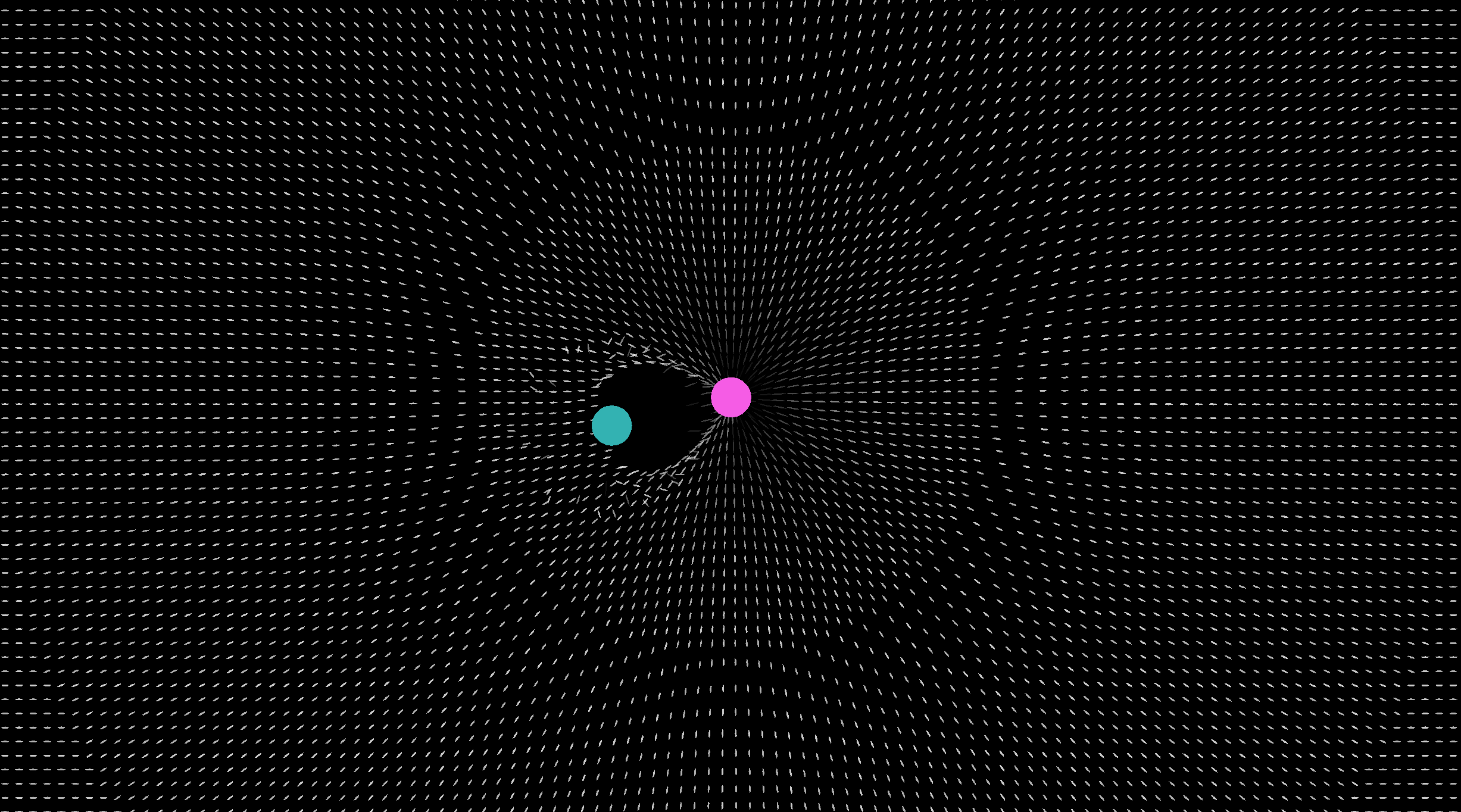
It looks better in motion, of course!
But it would also look better with pretty colors. So let's add those in next.
Sidequest 2-2: Dynamic Lighting Grid
As I was playing around with the grid and our boring, flat colored player and enemy, I also thought it'd be neat if they gave off pseudo-lighting. Currently the engine does not do lighting, so this is a fun way to show what you could do instead. It also just looks super cool.
The Concept
We'll have multiple LightSource components in our game, like on players and enemies and projectiles and whatnot. They will be configurable, like GravitySource. GridDot will also act as a sort of battery with a "bucket" for each color light that affects them. These buckets get charged up by light being near, and then slowly discharge. That way there's essentially dynamic lighting that mixes and has memory. It's not that simple, but it's also not that complicated.
Components and Config
Like with gravity, we need some consts for the player and enemy to make setup easier, and then some universal ones too
pub const PLAYER_LIGHT_RANGE: f32 = 1000.0;
pub const PLAYER_LIGHT_INTENSITY: f32 = 6.0; // Controls the strength of the light
pub const PLAYER_LIGHT_FALLOFF_POWER: f32 = 3.5; // Distance falloff curve shape (gentler)
pub const ENEMY_LIGHT_RANGE: f32 = 400.0;
pub const ENEMY_LIGHT_INTENSITY: f32 = 10.;
pub const ENEMY_LIGHT_FALLOFF_POWER: f32 = 2.5; // Distance falloff curve shape (gentler)

pub const CHARGE_RATE: f32 = 3.; // How quickly color updates
pub const DISCHARGE_RATE: f32 = 0.5; // How quickly stored color fades
pub const LIGHT_ALPHA_BOOST: f32 = 0.75; // How much brighter our dots get when they have charge.
pub const MAX_LIT_ALPHA: f32 = 1.0; // Max alpha for charged dots
pub const MAX_BUCKETS: usize = 8; // How many different colors we can support at once.
Unsurprisingly, we need to add a component. But also a struct to represent our color buckets, and of course good ol' GridDot gets expanded yet again. And while we're at it, we can go ahead and put in the system for our lighting calls now since we're editing lib.rs anyway.
#[component]
struct LightSource {
    falloff_distance: f32,
    strength: f32,
    falloff_power: f32,
}

#[derive(Clone, Copy, serde::Serialize, serde::Deserialize)]
struct ColorBucket {
    h: f32,
    s: f32,
    l: f32,
    current_strength: f32,
    target_strength: f32,
}

#[derive(Default)]
#[component]
struct GridDot {
    home_position: Vec2,
    base_alpha: f32,
    current_displacement: Vec2,
    current_height: f32,
    lit_base_alpha: f32,
    color_buckets: [Option<ColorBucket>; MAX_BUCKETS],
}


//Place BEFORE apply_grid_gravity_system
#[system]
fn apply_grid_lighting_system(
    grid_dots: Query<(Mut<Color>, Mut<GridDot>)>,
    light_sources: Query<(Ref<Transform>, Ref<Color>, Ref<LightSource>)>,
    frame_constants: Ref<FrameConstants>,
) {
    apply_grid_lighting(grid_dots, light_sources, frame_constants);
}
You may have been tempted to use a Vec to store our buckets, but components must implement the Copy trait. By using a fixed size array we can have a predictable number of bits needed. Technically it is inefficient to have more buckets than colors declared in your project - so at the moment we should probably put MAX_BUCKETS to two. But I have a feeling we'll expand on that shortly.
As always you'll need to expand your spawning systems to accomodate these changes. I don't believe I need to tell you how to do this at this point.
The Lighting System
Now we implement the actual lighting system.
use crate::{Color, ColorBucket, GravitySource, GridDot, LightSource, Transform};
pub fn apply_grid_lighting(
    mut grid_dots: Query<(Mut<Color>, Mut<GridDot>)>,
    light_sources: Query<(Ref<Transform>, Ref<Color>, Ref<LightSource>)>,
    frame_constants: Ref<FrameConstants>,
) {
    let delta_time = frame_constants.delta_time;

    // Pre-process light sources
    let lights: Vec<_> = light_sources
        .iter()
        .map(|(transform, color, light)| {
            let (h, s, l, _) = color_to_hsla(&color);
            (
                transform.position,
                h,
                s,
                l,
                light.falloff_distance,
                light.strength,
                light.falloff_power,
            )
        })
        .collect();

    grid_dots.for_each(|(mut color, mut grid_dot)| {
        let dot_pos = grid_dot.home_position + grid_dot.current_displacement;

        // === CALCULATE CURRENT LIGHTING ===
        let mut current_colors = [(0.0, 0.0, 0.0, 0.0); MAX_BUCKETS];
        let mut current_count = 0;

        for (light_pos, h, s, l, range, intensity, falloff_power) in &lights {
            let distance = (*light_pos - dot_pos).length();

            let falloff = (1.0 - (distance / range).min(1.0)).powf(*falloff_power); // We use the same formula as gravity for consistency...

            let strength = falloff * intensity;

            if strength > INFLUENCE_CUTOFF && current_count < MAX_BUCKETS { //we can reuse the influence cutoff const as it represents the same idea.
                current_colors[current_count] = (*h, *s, *l, strength);
                current_count += 1;
            }
        }

        // === MATCH EXISTING BUCKETS WITH CURRENT COLORS ===
        // Track which current colors have been handled
        let mut handled_colors = [false; MAX_BUCKETS];

        // First, iterate over all existing buckets
        for i in 0..MAX_BUCKETS {
            if let Some(ref mut bucket) = grid_dot.color_buckets[i] {
                let mut found_match = false;

                // Check if this bucket matches any current color
                for j in 0..current_count {
                    if !handled_colors[j] {
                        let (h, s, l, strength) = current_colors[j];

                        if (bucket.h - h).abs() < 1.0 && // Slight amount of tolerance
                           (bucket.s - s).abs() < 0.1 &&
                           (bucket.l - l).abs() < 0.1
                        {
                            bucket.target_strength = strength;
                            handled_colors[j] = true;
                            found_match = true;
                            break;
                        }
                    }
                }

                // If no match found, this bucket should start to discharge.
                if !found_match {
                    bucket.target_strength = 0.0;
                }
            }
        }

        // If any of our current lights didn't already get assigned a bucket, we do so now.
        for i in 0..current_count {
            if !handled_colors[i] {
                let (h, s, l, strength) = current_colors[i];

                for j in 0..MAX_BUCKETS {
                    if grid_dot.color_buckets[j].is_none() {
                        grid_dot.color_buckets[j] = Some(ColorBucket {
                            h,
                            s,
                            l,
                            current_strength: 0.0,
                            target_strength: strength,
                        });
                        break;
                    }
                }
            }
        }

        // === UPDATE BUCKETS ===
        for i in 0..MAX_BUCKETS {
            if let Some(ref mut bucket) = grid_dot.color_buckets[i] {
                if bucket.current_strength < bucket.target_strength {
                    // Charge up towards target
                    let charge_amount = (bucket.target_strength - bucket.current_strength)
                        * CHARGE_RATE
                        * delta_time;
                    bucket.current_strength =
                        (bucket.current_strength + charge_amount).min(bucket.target_strength);
                } else if bucket.current_strength > bucket.target_strength {
                    // Discharge down towards target
                    let discharge_amount = (bucket.current_strength - bucket.target_strength)
                        * DISCHARGE_RATE
                        * delta_time;
                    bucket.current_strength =
                        (bucket.current_strength - discharge_amount).max(bucket.target_strength);
                }

                // Clear if too weak
                if bucket.current_strength < 0.00001 {
                    grid_dot.color_buckets[i] = None;
                }
            }
        }

        // === BLEND BUCKETS FOR DISPLAY ===
        let mut total_strength = 0.0;
        for i in 0..MAX_BUCKETS {
            if let Some(bucket) = &grid_dot.color_buckets[i] {
                total_strength += bucket.current_strength;
            }
        }

        if total_strength > 0.01 {
            // Weighted blend of all buckets
            let mut blended_h = 0.0;
            let mut blended_s = 0.0;
            let mut blended_l = 0.0;

            for i in 0..MAX_BUCKETS {
                if let Some(bucket) = &grid_dot.color_buckets[i] {
                    let weight = bucket.current_strength / total_strength;
                    blended_h += bucket.h * weight;
                    blended_s += bucket.s * weight;
                    blended_l += bucket.l * weight;
                }
            }

            // Mix with white based on total strength
            let intensity = total_strength.min(1.0);
            let final_s = blended_s * intensity;
            let final_l = blended_l * intensity + (1.0 - intensity);

            *color = Color::from_hsla(blended_h, final_s, final_l, color.a());

            // Alpha boost
            let alpha_boost = 1.0 + intensity * LIGHT_ALPHA_BOOST;
            grid_dot.lit_base_alpha = (grid_dot.base_alpha * alpha_boost).min(MAX_LIT_ALPHA);
        } else {
            // No buckets - pure white
            *color = Color::new(1.0, 1.0, 1.0, color.a());
            grid_dot.lit_base_alpha = grid_dot.base_alpha;
        }
    });
}
I would make sure you really understand what the above code does before adding it in! You may even come up with a better approach. This was just what made sense to me, looked good, and din't hurt performance too much.
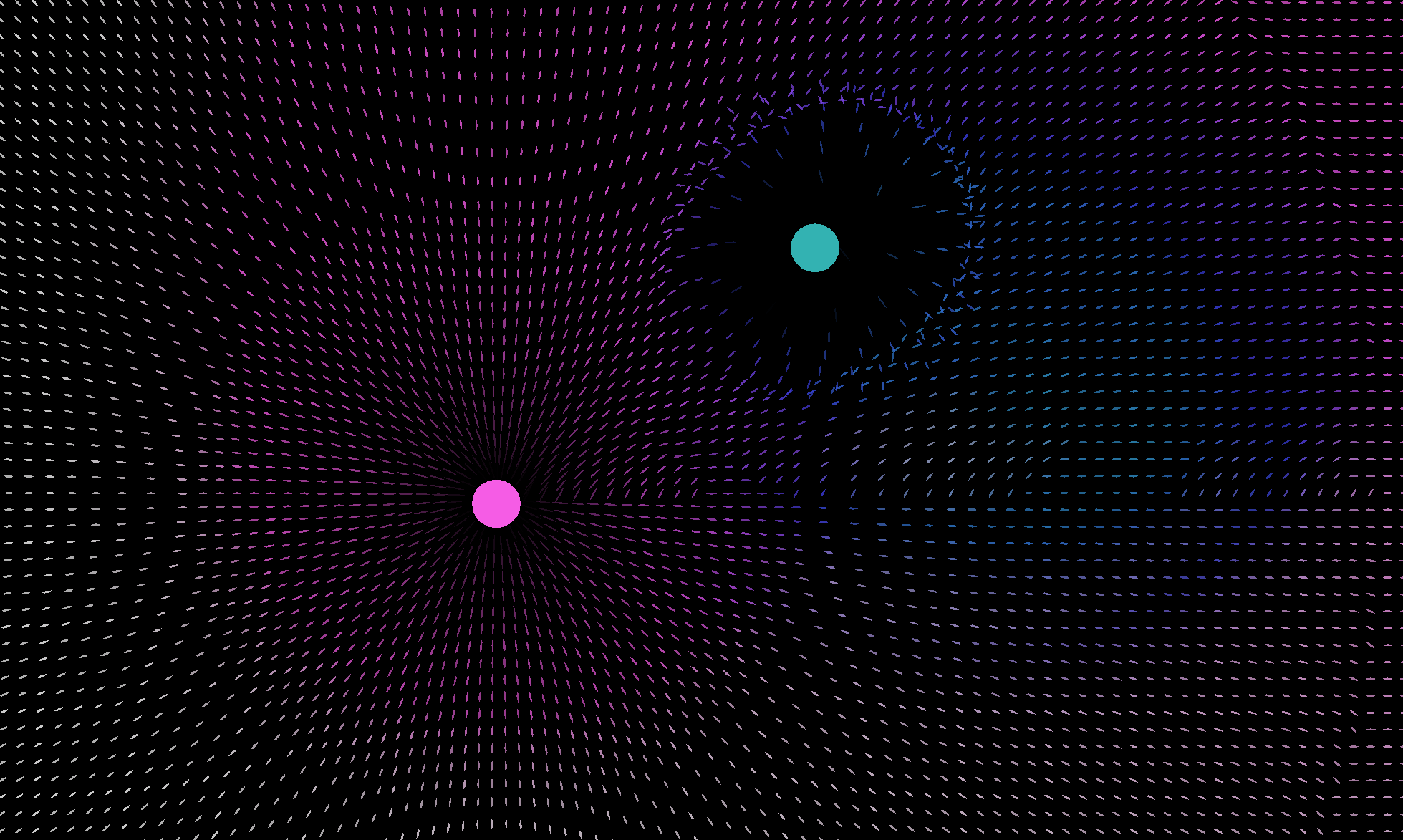
It's way cooler in motion, too!
Now we can return to functionality and add in aiming.
Aim Towards the Mouse
We're making a shooty game. Not sure if you knew that, but we are. It's nice to be able to aim when shooty. If you went on that side quest for me, now it's time for something much easier
Collecting our mouse position
For now we're going to bloat our update_player_input system a little bit in lib.rs. That's why we did the refactor last chapter, to give us room to be lazy here.
We add aim_position to our PlayerInput component. Naming is important because, eventually, we'll support updating this position with... other methods. Like a controller.
#[derive(Default)]
#[resource]
struct PlayerInput {
    move_axes: Vec2,
    aim_position: Vec2,
}


#[system]
fn update_player_input(
    mut player_input: Mut<PlayerInput>,
    input: Ref<InputState>,
    camera: Query<(Ref<Transform>, Ref<Camera>)>,
    window: Ref<Window>,
) {
    let key_to_f32 = |key_code| {
        if input.keys[key_code].pressed() {
            1.0
        } else {
            0.0
        }
    };

    player_input.move_axes = Vec2::new(
        key_to_f32(KeyCode::KeyD) - key_to_f32(KeyCode::KeyA),
        key_to_f32(KeyCode::KeyW) - key_to_f32(KeyCode::KeyS),
    )
    .clamp_length_max(1.);


    //New camera stuff:
    let Some((camera_transform, camera)) = camera.get(0) else {
        return;
    };

    let normalized_cursor_position = input.mouse.cursor_position / window.size - 0.5;

    let CameraAspect::FixedVirtualHeight { height } = camera.aspect else {
        return;
    };

    let scale = Vec2::new(window.size.x * (height / window.size.y), -height);

    let view_cursor_position = normalized_cursor_position * scale;
    player_input.aim_position = view_cursor_position + camera_transform.position;
}
The engine makes this pretty convenient. The InputState resource keeps track of our mouse's cursor position. It's up to us to adjust it for where in the current window it is.
Hurray, now you have an aim position!
We probably want to make sure it works, though, so let's add a reticle.
Adding a Reticle
We're spawning something, so what time is it? That's right, it's time for a new function in our spawn_systems.rs. You could use a reticle image and assign it as a texture to your reticle, but I want to create it using in-engine shape tools. Actually right now we can't disable the OS cursor, so you might not want to use this for any reason besides debugging. I also want to make the reticle be a gravity and light source because I think it'll be neat. If you didn't go on our recent sidequest you won't be able to participate on that part.
First we'll add a Reticle component to our growing list of components. It doesn't need any information so it can also just be another tag component. We'll also need to call our spawn-reticle function that we're just about to write.
#[component]
struct Reticle;

#[system_once]
fn spawn_everything(engine: Ref<Engine>) {
    spawn_grid_dots(&engine);
    spawn_camera(&engine);
    spawn_player(&engine);
    spawn_enemy(&engine);
    spawn_reticle(&engine);
}
pub fn spawn_reticle(engine: &Engine) {
    let transform = &Transform {
        layer: 100., // We want this to show up above everything else.
        ..Default::default()
    };
    let color = &Color::new(0.8, 0.6, 0.2, 1.0);

    let circle_render = &CircleRender {
        num_sides: 7,
        size: Vec2::splat(15.0),
        visible: true,
    };

    let light = &LightSource {
        falloff_distance: 100.,
        strength: 30.,
        falloff_power: 1.5,
    };

    let grid_gravity = &GravitySource {
        strength: -80.,
        falloff_distance: 50.,
        falloff_power: 0.5,
    };

    engine.spawn(bundle!(
        transform,
        color,
        circle_render,
        light,
        grid_gravity,
        &Reticle
    ));
}
Of course, just spawning it isn't enough, so let's add in a system to finish the job!
#[system]
fn update_reticle_position_system(
    mut reticle_query: Query<(Mut<Transform>, Ref<Reticle>)>,
    player_input: Ref<PlayerInput>,
) {
    let Some((mut transform, _)) = reticle_query.get_mut(0) else {
        return;
    };
    transform.position = player_input.aim_position;
}
And that's it! Enjoy playing around with the gravity and light system with your cursor, or at least dragging your cursor around. Don't get too caught up, though, it's time to make our shooty game go shoot!
Fire a Projectile
We're not going to get too in depth here, because we're going to be expanding this greatly in the next chapter.
But we want to feel like a game first!
Fire Input
The simplest thing to get out of the way first, of course, is to detect when we should fire.
For our movement axes we've been using [button].pressed() to tell if it's pressed or not. This is great for continuous things like movement. If we were to check just if a button is pressed or not for firing, without implementing some kind of cooldown then it would fire every single frame. We'll do that eventually but for today we're going to use [button].just_pressed() instead which is only true the frame a button is pressed. So to our PlayerInput resource we'll add a fire_projectile bool and update it when we update the rest of those things.
All in lib.rs
#[derive(Default)]
#[resource]
struct PlayerInput {
    move_axes: Vec2,
    aim_position: Vec2,
    fire_projectile: bool,
}

#[system]
fn update_player_input(
    mut player_input: Mut<PlayerInput>,
    input: Ref<InputState>,
    camera: Query<(Ref<Transform>, Ref<Camera>)>,
    window: Ref<Window>,
) {
    // [...] previous code
    player_input.fire_projectile = input.mouse.buttons[MouseButton::Left].just_pressed();
}
Doing the Firing
Okay, so now we have a bool in our PlayerInput resource that tracks whether or not we clicked the left mouse button. So what are we going to do with that? Add a system, of course. It'll be simple - place it after we update input, and if fire_projectile is true, do so.
#[system]
fn fire_projectile_system(
    player_input: Ref<PlayerInput>,
    player_query: Query<(Ref<Transform>, Ref<Player>)>,
    engine: Ref<Engine>,
) {
    let Some((player_transform, _)) = player_query.get(0) else {
        return;
    };

    if player_input.fire_projectile {
        fire_projectile(
            player_input.aim_position,
            player_transform.position,
            &engine,
        );
    }
}
To fire the projectile, we just spawn it and give it a Velocity component. Since we already set that up to handle movement, we don't have to do any more work than that.
I'll be including a LightSource and GravitySource from our sidequest, as well, because it's awesome. Unfortunately it's also not free, performance wise. There's no reason to keep them around for longer than a few seconds when they're thousands of units away. Because we'll be later adding a bunch of things that have to have a timer, we'll first add a Timer component and a system that counts them donw. Then, we'll be adding a Projectile tag component and a system that clears those up after their timer runs out.
So for timers it's quite simple
struct Timer {
    time_remaining: f32,
}

//Place this system early, perhaps at the top of the order:
#[system]
fn update_timers(mut timers: Query<Mut<Timer>>, frame_constants: Ref<FrameConstants>) {
    for mut timer in timers.iter_mut() {
        if timer.time_remaining > 0.0 {
            timer.time_remaining -= frame_constants.delta_time;
        }
    }
}
This takes all timers and counts themd own by the delta_time, if they have more than 0 seconds remaining. They may or may not end up negative because of this, so we'll take that into account with our systems that use them.
For the Projectile spawning:
#[component]
struct Projectile;


fn fire_projectile(aim_position: Vec2, player_position: Vec2, engine: &Engine) {
    let direction = (aim_position - player_position).normalize();
    let transform = &Transform {
        position: player_position,
        layer: 10., // We want this to be very visible on top of most everything else.
        ..Default::default()
    };

    let color = &Color::RED;

    let circle_render = &CircleRender {
        num_sides: 20,
        size: Vec2::splat(15.0),
        visible: true,
    };

    let light = &LightSource {
        falloff_distance: 100.,
        strength: 100.,
        falloff_power: 1.5,
    };

    let grid_gravity = &GravitySource {
        strength: 1000.,
        falloff_distance: 100.,
        falloff_power: 1.5,
    };

    let velocity = &Velocity {
        current_velocity: direction * 2000.,
        max_velocity: 2000.,
    };

    let projectile = &Projectile;

    let timer = &Timer { time_remaining: 2.0 };

    engine.spawn(bundle!(
        transform,
        color,
        circle_render,
        light,
        grid_gravity,
        velocity,
        projectile,
        timer,
    ));
}
And, finally, the system to clean up projectiles...
#[system]
fn update_projectiles(
    projectiles: Query<(Ref<Projectile>, Ref<EntityId>, Ref<Timer>)>,
    engine: Ref<Engine>,
) {
    for (_, entity_id, timer) in projectiles.iter() {
        if timer.time_remaining <= 0.0 {
            engine.despawn(*entity_id);
        }
    }
}
Put it all together, you should now be able to click and shoot projectiles that clean themselves up after a while. They're dyanmic and fun with the grid systems we have. And they're ripe for expansion in the next chapter, where we actually implement a combat system. Hop right into chapter 3 or review what my files look like at this point in our appendix for this chapter.
Appendix - Project so Far
Here's our full file directory:
Tutorial-Project/
├── Cargo.toml
├── build.rs
└── src/
    ├── lib.rs
    │   ├── Components:
    │   │   ├── Player
    │   │   ├── Enemy
    │   │   ├── Reticle
    │   │   ├── Projectile
    │   │   ├── LightSource
    │   │   ├── GridDot
    │   │   ├── GravitySource
    │   │   ├── Velocity
    │   │   └── Acceleration
    │   ├── Resources:
    │   │   └── PlayerInput
    │   └── Systems:
    │       ├── update_projectile_lifetime
    │       ├── sync_player_movement_to_config_consts
    │       ├── update_player_input
    │       ├── spawn_everything
    │       ├── apply_grid_lighting_system
    │       ├── apply_grid_gravity_system
    │       ├── update_player_acceleration_system
    │       ├── update_enemy_acceleration_system
    │       ├── apply_acceleration_system
    │       ├── apply_velocity_system
    │       ├── update_camera_position_system
    │       ├── update_reticle_position_system
    │       └── fire_projectile_system
    ├── config.rs
    ├── ffi.rs
    ├── grid_systems.rs
    │   ├── apply_grid_lighting
    │   └── apply_grid_gravity
    ├── movement_systems.rs
    │   ├── update_player_acceleration
    │   ├── update_enemy_acceleration
    │   ├── apply_acceleration
    │   └── apply_velocity
    ├── spawn_systems.rs
    │   ├── spawn_grid_dots
    │   ├── spawn_camera
    │   ├── spawn_player
    │   ├── spawn_enemy
    │   └── spawn_reticle
    └── util.rs
        └── color_to_hsla
Individual files from src:
lib.rs
use engine::prelude::*;
mod config;
mod ffi;
mod grid_systems;
mod movement_systems;
mod spawn_systems;
mod util;
use crate::config::*;
use crate::grid_systems::*;
use crate::movement_systems::*;
use crate::spawn_systems::*;

#[derive(Default)]
#[resource]
struct PlayerInput {
    move_axes: Vec2,
    aim_position: Vec2,
    fire_projectile: bool,
}

#[component]
struct Player;

#[component]
struct Enemy;

#[component]
struct Reticle;

#[component]
struct Projectile {
    lifetime: f32,
}

#[component]
struct LightSource {
    falloff_distance: f32,
    strength: f32,
    falloff_power: f32,
}

#[derive(Default)]
#[component]
struct GridDot {
    home_position: Vec2,
    base_alpha: f32,
    current_displacement: Vec2,
    current_height: f32,
    lit_base_alpha: f32,
    color_buckets: [Option<ColorBucket>; MAX_BUCKETS],
}

#[derive(Clone, Copy, serde::Serialize, serde::Deserialize)]
struct ColorBucket {
    h: f32,
    s: f32,
    l: f32,
    current_strength: f32,
    target_strength: f32,
}
#[derive(Default)]
#[component]
struct GravitySource {
    strength: f32,
    falloff_distance: f32,
    falloff_power: f32,
}

#[derive(Default)]
#[component]
struct Velocity {
    current_velocity: Vec2,
    max_velocity: f32,
}

#[derive(Default)]
#[component]
struct Acceleration {
    acceleration_rate: f32,
    deceleration_rate: f32,
    target_velocity: Vec2,
}

#[system]
fn update_projectile_lifetime(
    mut projectiles: Query<(Mut<Projectile>, Ref<EntityId>)>,
    frame_constants: Ref<FrameConstants>,
    engine: Ref<Engine>,
) {
    projectiles.for_each(|(mut projectile, entity_id)| {
        projectile.lifetime -= frame_constants.delta_time;
        if projectile.lifetime < 0.0 {
            engine.despawn(*entity_id);
        }
    });
}

#[system]
fn sync_player_movement_to_config_consts(
    mut player: Query<(Mut<Acceleration>, Mut<Velocity>, Ref<Player>)>,
) {
    let Some((mut acceleration, mut velocity, _)) = player.get_mut(0) else {
        return;
    };
    velocity.max_velocity = PLAYER_MAX_VELOCITY;
    acceleration.acceleration_rate = PLAYER_ACCELERATION;
    acceleration.deceleration_rate = PLAYER_DECELERATION;
}

#[system]
fn update_player_input(
    mut player_input: Mut<PlayerInput>,
    input: Ref<InputState>,
    camera: Query<(Ref<Transform>, Ref<Camera>)>,
    window: Ref<Window>,
) {
    let key_to_f32 = |key_code| {
        if input.keys[key_code].pressed() {
            1.0
        } else {
            0.0
        }
    };

    player_input.move_axes = Vec2::new(
        key_to_f32(KeyCode::KeyD) - key_to_f32(KeyCode::KeyA),
        key_to_f32(KeyCode::KeyW) - key_to_f32(KeyCode::KeyS),
    )
    .clamp_length_max(1.);

    let Some((camera_transform, camera)) = camera.get(0) else {
        return;
    };

    let normalized_cursor_position = input.mouse.cursor_position / window.size - 0.5;

    let CameraAspect::FixedVirtualHeight { height } = camera.aspect else {
        return;
    };

    let scale = Vec2::new(window.size.x * (height / window.size.y), -height);

    let view_cursor_position = normalized_cursor_position * scale;
    player_input.aim_position = view_cursor_position + camera_transform.position;

    player_input.fire_projectile = input.mouse.buttons[MouseButton::Left].just_pressed();
}

#[system_once]
fn spawn_everything(engine: Ref<Engine>) {
    spawn_grid_dots(&engine);
    spawn_camera(&engine);
    spawn_player(&engine);
    spawn_enemy(&engine);
    spawn_reticle(&engine);
}

#[system]
fn apply_grid_lighting_system(
    grid_dots: Query<(Mut<Color>, Mut<GridDot>)>,
    light_sources: Query<(Ref<Transform>, Ref<Color>, Ref<LightSource>)>,
    frame_constants: Ref<FrameConstants>,
) {
    apply_grid_lighting(grid_dots, light_sources, frame_constants);
}
#[system]
fn apply_grid_gravity_system(
    grid_dots: Query<(Mut<Transform>, Mut<GridDot>, Mut<Color>)>,
    gravity_sources: Query<(Ref<Transform>, Ref<GravitySource>)>,
    frame_constants: Ref<FrameConstants>,
) {
    apply_grid_gravity(grid_dots, gravity_sources, frame_constants);
}

#[system]
fn update_player_acceleration_system(
    player_input: Ref<PlayerInput>,
    player_query: Query<(Mut<Acceleration>, Ref<Velocity>, Ref<Player>)>,
) {
    update_player_acceleration(player_input, player_query);
}

#[system]
fn update_enemy_acceleration_system(
    enemy_query: Query<(Mut<Acceleration>, Ref<Velocity>, Ref<Transform>, Ref<Enemy>)>,
    player_query: Query<(Ref<Transform>, Ref<Player>)>,
) {
    update_enemy_acceleration(enemy_query, player_query);
}

#[system]
fn apply_acceleration_system(
    velocities_to_adjust: Query<(Ref<Acceleration>, Mut<Velocity>)>,
    frame_constants: Ref<FrameConstants>,
) {
    apply_acceleration(velocities_to_adjust, frame_constants);
}
#[system]
fn apply_velocity_system(
    entities_to_move: Query<(Mut<Transform>, Ref<Velocity>)>,
    frame_constants: Ref<FrameConstants>,
) {
    apply_velocity(entities_to_move, frame_constants);
}

#[system]
fn update_camera_position_system(
    camera_query: Query<(Mut<Transform>, Ref<Camera>)>,
    player_query: Query<(Ref<Transform>, Ref<Player>)>,
) {
    update_camera_position(camera_query, player_query);
}

#[system]
fn update_reticle_position_system(
    mut reticle_query: Query<(Mut<Transform>, Ref<Reticle>)>,
    player_input: Ref<PlayerInput>,
) {
    let Some((mut transform, _)) = reticle_query.get_mut(0) else {
        return;
    };
    transform.position = player_input.aim_position;
}

#[system]
fn fire_projectile_system(
    player_input: Ref<PlayerInput>,
    player_query: Query<(Ref<Transform>, Ref<Player>)>,
    engine: Ref<Engine>,
) {
    let Some((player_transform, _)) = player_query.get(0) else {
        return;
    };

    if player_input.fire_projectile {
        fire_projectile(
            player_input.aim_position,
            player_transform.position,
            &engine,
        );
    }
}

fn fire_projectile(aim_position: Vec2, player_position: Vec2, engine: &Engine) {
    let direction = (aim_position - player_position).normalize();
    let transform = &Transform {
        position: player_position,
        layer: 10.,
        ..Default::default()
    };

    let color = &Color::RED;

    let circle_render = &CircleRender {
        num_sides: 20,
        size: Vec2::splat(15.0),
        visible: true,
    };

    let light = &LightSource {
        falloff_distance: 100.,
        strength: 100.,
        falloff_power: 1.5,
    };

    let grid_gravity = &GravitySource {
        strength: 1000.,
        falloff_distance: 100.,
        falloff_power: 1.5,
    };

    let velocity = &Velocity {
        current_velocity: direction * 2000.,
        max_velocity: 2000.,
    };
    let projectile = &Projectile { lifetime: 2.0 };

    engine.spawn(bundle!(
        transform,
        color,
        circle_render,
        light,
        grid_gravity,
        velocity,
        projectile,
    ));
}
config.rs
pub const PLAYER_MAX_VELOCITY: f32 = 750.;
pub const PLAYER_ACCELERATION: f32 = 9000.;
pub const PLAYER_DECELERATION: f32 = 12000.;
pub const ZERO_VELOCITY_THRESHOLD: f32 = 0.1;

pub const ENEMY_MAX_VELOCITY: f32 = 300.;
pub const ENEMY_ACCELERATION: f32 = 1000.;
pub const ENEMY_DECELERATION: f32 = 5000.;

pub const ENEMY_CHASE_DISTANCE: f32 = 1000.;
pub const ENEMY_STOP_DISTANCE: f32 = 200.;

pub const GRID_DOT_SIZE: f32 = 6.;
pub const GRID_DOT_SIDES: u32 = 5;
pub const GRID_DOT_SPACING: f32 = 25.;
pub const GRID_ROWS: u32 = 200;
pub const GRID_COLS: u32 = 200;
pub const GRID_DOT_ALPHA_1: f32 = 0.7;
pub const GRID_DOT_ALPHA_2: f32 = 0.8;
pub const GRID_DOT_COLOR_SPACING: u32 = 5;

pub const PLAYER_GRAVITY_STRENGTH: f32 = 10000.0;
pub const PLAYER_FALLOFF_POWER: f32 = 10.0;
pub const PLAYER_FALLOFF_DISTANCE: f32 = 1500.0;

pub const ENEMY_GRAVITY_STRENGTH: f32 = -10000.0;
pub const ENEMY_FALLOFF_POWER: f32 = 5.0;
pub const ENEMY_FALLOFF_DISTANCE: f32 = 250.0;

pub const MIN_GRAVITY_DISTANCE: f32 = 0.01;
pub const INFLUENCE_CUTOFF: f32 = 0.00001;

pub const MAX_DISPLACEMENT: f32 = 100.0;
pub const MAX_STRETCH_AMOUNT: f32 = 3.;
pub const STRETCH_SENSITIVITY: f32 = 0.3;

pub const MAX_HEIGHT_RANGE: f32 = 3.0;
pub const ALPHA_SENSITIVITY: f32 = 3.;
pub const MIN_ALPHA_PERCENTAGE: f32 = 0.11;

pub const SMOOTHING_TIME: f32 = 0.1;

pub const PLAYER_LIGHT_RANGE: f32 = 1000.0;
pub const PLAYER_LIGHT_INTENSITY: f32 = 6.0;
pub const PLAYER_LIGHT_FALLOFF_POWER: f32 = 3.5;
pub const ENEMY_LIGHT_RANGE: f32 = 400.0;
pub const ENEMY_LIGHT_INTENSITY: f32 = 10.;
pub const ENEMY_LIGHT_FALLOFF_POWER: f32 = 2.5;

pub const CHARGE_RATE: f32 = 2.;
pub const DISCHARGE_RATE: f32 = 0.5;
pub const LIGHT_ALPHA_BOOST: f32 = 0.75;
pub const MAX_LIT_ALPHA: f32 = 1.0;
pub const MAX_BUCKETS: usize = 8;
grid_systems.rs
use crate::config::*;
use crate::util::*;
use crate::{Color, ColorBucket, GravitySource, GridDot, LightSource, Transform};
use engine::prelude::*;

pub fn apply_grid_lighting(
    mut grid_dots: Query<(Mut<Color>, Mut<GridDot>)>,
    light_sources: Query<(Ref<Transform>, Ref<Color>, Ref<LightSource>)>,
    frame_constants: Ref<FrameConstants>,
) {
    let delta_time = frame_constants.delta_time;

    // Pre-process light sources
    let lights: Vec<_> = light_sources
        .iter()
        .map(|(transform, color, light)| {
            let (h, s, l, _) = color_to_hsla(&color);
            (
                transform.position,
                h,
                s,
                l,
                light.falloff_distance,
                light.strength,
                light.falloff_power,
            )
        })
        .collect();

    grid_dots.for_each(|(mut color, mut grid_dot)| {
        let dot_pos = grid_dot.home_position + grid_dot.current_displacement;

        // === CALCULATE CURRENT LIGHTING ===
        let mut current_colors = [(0.0, 0.0, 0.0, 0.0); MAX_BUCKETS];
        let mut current_count = 0;

        for (light_pos, h, s, l, range, intensity, falloff_power) in &lights {
            let distance = (*light_pos - dot_pos).length();

            let falloff = (1.0 - (distance / range).min(1.0)).powf(*falloff_power);

            let strength = falloff * intensity;

            if strength > 0.01 && current_count < MAX_BUCKETS {
                current_colors[current_count] = (*h, *s, *l, strength);
                current_count += 1;
            }
        }

        // === MATCH EXISTING BUCKETS WITH CURRENT COLORS ===
        // Track which current colors have been handled
        let mut handled_colors = [false; MAX_BUCKETS];

        // First, iterate over all existing buckets
        for i in 0..MAX_BUCKETS {
            if let Some(ref mut bucket) = grid_dot.color_buckets[i] {
                let mut found_match = false;

                // Check if this bucket matches any current color
                for j in 0..current_count {
                    if !handled_colors[j] {
                        let (h, s, l, strength) = current_colors[j];

                        if (bucket.h - h).abs() < 1.0 && // 1 degrees hue tolerance
                           (bucket.s - s).abs() < 0.1 &&
                           (bucket.l - l).abs() < 0.1
                        {
                            bucket.target_strength = strength;
                            handled_colors[j] = true;
                            found_match = true;
                            break;
                        }
                    }
                }

                // If no match found, this bucket should fade out
                if !found_match {
                    bucket.target_strength = 0.0;
                }
            }
        }

        // === FILL EMPTY BUCKETS WITH REMAINING CURRENT COLORS ===
        for i in 0..current_count {
            if !handled_colors[i] {
                let (h, s, l, strength) = current_colors[i];

                // Find empty slot for new bucket
                for j in 0..MAX_BUCKETS {
                    if grid_dot.color_buckets[j].is_none() {
                        grid_dot.color_buckets[j] = Some(ColorBucket {
                            h,
                            s,
                            l,
                            current_strength: 0.0,
                            target_strength: strength,
                        });
                        break;
                    }
                }
            }
        }

        // === UPDATE BUCKETS ===
        for i in 0..MAX_BUCKETS {
            if let Some(ref mut bucket) = grid_dot.color_buckets[i] {
                if bucket.current_strength < bucket.target_strength {
                    // Charge up towards target
                    let charge_amount = (bucket.target_strength - bucket.current_strength)
                        * CHARGE_RATE
                        * delta_time;
                    bucket.current_strength =
                        (bucket.current_strength + charge_amount).min(bucket.target_strength);
                } else if bucket.current_strength > bucket.target_strength {
                    // Discharge down towards target
                    let discharge_amount = (bucket.current_strength - bucket.target_strength)
                        * DISCHARGE_RATE
                        * delta_time;
                    bucket.current_strength =
                        (bucket.current_strength - discharge_amount).max(bucket.target_strength);
                }

                // Clear if too weak
                if bucket.current_strength < 0.00001 {
                    grid_dot.color_buckets[i] = None;
                }
            }
        }

        // === BLEND BUCKETS FOR DISPLAY ===
        let mut total_strength = 0.0;
        for i in 0..MAX_BUCKETS {
            if let Some(bucket) = &grid_dot.color_buckets[i] {
                total_strength += bucket.current_strength;
            }
        }

        if total_strength > 0.01 {
            // Weighted blend of all buckets
            let mut blended_h = 0.0;
            let mut blended_s = 0.0;
            let mut blended_l = 0.0;

            for i in 0..MAX_BUCKETS {
                if let Some(bucket) = &grid_dot.color_buckets[i] {
                    let weight = bucket.current_strength / total_strength;
                    blended_h += bucket.h * weight;
                    blended_s += bucket.s * weight;
                    blended_l += bucket.l * weight;
                }
            }

            // Mix with white based on total strength
            let intensity = total_strength.min(1.0);
            let final_s = blended_s * intensity;
            let final_l = blended_l * intensity + (1.0 - intensity);

            *color = Color::from_hsla(blended_h, final_s, final_l, color.a());

            // Alpha boost
            let alpha_boost = 1.0 + intensity * LIGHT_ALPHA_BOOST;
            grid_dot.lit_base_alpha = (grid_dot.base_alpha * alpha_boost).min(MAX_LIT_ALPHA);
        } else {
            // No buckets - pure white
            *color = Color::new(1.0, 1.0, 1.0, color.a());
            grid_dot.lit_base_alpha = grid_dot.base_alpha;
        }
    });
}

pub fn apply_grid_gravity(
    mut grid_dots: Query<(Mut<Transform>, Mut<GridDot>, Mut<Color>)>,
    gravity_sources: Query<(Ref<Transform>, Ref<GravitySource>)>,
    frame_constants: Ref<FrameConstants>,
) {
    let sources: Vec<_> = gravity_sources
        .iter()
        .map(|(transform, gravity)| {
            (
                transform.position,
                gravity.strength,
                gravity.falloff_distance,
                gravity.falloff_power,
            )
        })
        .collect();

    let dt = frame_constants.delta_time;
    let smoothing_factor = (1.0 - (-dt / SMOOTHING_TIME).exp()).min(1.0);

    grid_dots.for_each(|(mut transform, mut grid_dot, mut color)| {
        // Calculate combined influence from all sources
        let mut weighted_sum = Vec2::ZERO;
        let mut max_possible = 0.0;

        for (source_pos, strength, falloff_distance, falloff_power) in &sources {
            let to_source = *source_pos - grid_dot.home_position;
            let distance = to_source.length().max(MIN_GRAVITY_DISTANCE);
            let direction = to_source / distance;

            let falloff = (1.0 - (distance / falloff_distance).min(1.0)).powf(*falloff_power);
            let influence = strength * falloff;
            if influence.abs() > INFLUENCE_CUTOFF {
                weighted_sum += direction * influence;
                max_possible += strength.abs();
            }
        }

        // Calculate influence direction
        let influence_direction = weighted_sum.try_normalize().unwrap_or(Vec2::ZERO);

        // For non-displacement effects, normalize by max possible
        let influence_strength = if max_possible > 0.0 {
            (weighted_sum.length() / max_possible).min(1.0)
        } else {
            0.0
        };

        // For displacement, don't normalize - just clamp the final result
        // This preserves the actual push/pull strength
        let displacement_vector = (weighted_sum).clamp_length_max(MAX_DISPLACEMENT);
        let target_position = grid_dot.home_position + displacement_vector;

        let target_height = influence_strength * MAX_HEIGHT_RANGE;
        let stretch = 1. + (MAX_STRETCH_AMOUNT - 1.) * (influence_strength + STRETCH_SENSITIVITY);
        let target_scale = Vec2::new(stretch, 1.0 / stretch.sqrt());

        let target_rotation = influence_direction.y.atan2(influence_direction.x);

        // Smooth position (stored as displacement for lighting system compatibility)
        let new_position = transform.position.lerp(target_position, smoothing_factor);
        grid_dot.current_displacement = new_position - grid_dot.home_position;
        transform.position = new_position;

        grid_dot.current_height = target_height;

        // Smooth scale
        transform.scale = transform.scale.lerp(target_scale, smoothing_factor);

        // Smooth rotation with angle wrapping
        let current_rot = transform.rotation;
        let rotation_diff = {
            let diff = target_rotation - current_rot;
            if diff > std::f32::consts::PI {
                diff - 2.0 * std::f32::consts::PI
            } else if diff < -std::f32::consts::PI {
                diff + 2.0 * std::f32::consts::PI
            } else {
                diff
            }
        };
        transform.rotation = current_rot + rotation_diff * smoothing_factor;

        // Apply alpha based on height
        let height_factor = (grid_dot.current_height / MAX_HEIGHT_RANGE).clamp(0.0, 1.0);
        let min_alpha = grid_dot.base_alpha * MIN_ALPHA_PERCENTAGE;
        let alpha = grid_dot.base_alpha
            - (grid_dot.base_alpha - min_alpha) * height_factor * ALPHA_SENSITIVITY;
        *color = Color::new(color.r(), color.g(), color.b(), alpha);
    });
}
movement_systems.rs
use crate::config::*;
use crate::{Acceleration, Enemy, Player, PlayerInput, Velocity};
use engine::prelude::*;

pub fn update_player_acceleration(
    player_input: Ref<PlayerInput>,
    mut player_query: Query<(Mut<Acceleration>, Ref<Velocity>, Ref<Player>)>,
) {
    let Some((mut acceleration, velocity, _)) = player_query.get_mut(0) else {
        return;
    };

    acceleration.target_velocity = player_input.move_axes * velocity.max_velocity;
}

pub fn update_enemy_acceleration(
    mut enemy_query: Query<(Mut<Acceleration>, Ref<Velocity>, Ref<Transform>, Ref<Enemy>)>,
    player_query: Query<(Ref<Transform>, Ref<Player>)>,
) {
    let Some((player_transform, _)) = player_query.get(0) else {
        return;
    };

    enemy_query.for_each(|(mut acceleration, velocity, transform, _)| {
        let to_player = player_transform.position - transform.position;
        let distance = to_player.length();

        if distance > ENEMY_CHASE_DISTANCE {
            acceleration.target_velocity = Vec2::ZERO;
        } else {
            let ideal_position =
                player_transform.position - to_player.normalize() * ENEMY_STOP_DISTANCE;

            let to_ideal = ideal_position - transform.position;
            let distance_to_ideal = to_ideal.length();

            if distance_to_ideal < 20.0 {
                acceleration.target_velocity = Vec2::ZERO;
            } else {
                let speed_factor = if distance_to_ideal < 50.0 { 0.5 } else { 1.0 };
                acceleration.target_velocity =
                    to_ideal.normalize_or_zero() * (velocity.max_velocity * speed_factor);
            }
        }
    });
}

pub fn apply_acceleration(
    mut velocities_to_adjust: Query<(Ref<Acceleration>, Mut<Velocity>)>,
    frame_constants: Ref<FrameConstants>,
) {
    velocities_to_adjust.for_each(|(acceleration, mut velocity)| {
        // Calculate the difference between current and target velocity
        let velocity_delta = acceleration.target_velocity - velocity.current_velocity;

        // Determine if we're accelerating or decelerating
        let is_decelerating = acceleration.target_velocity == Vec2::ZERO
            || acceleration.target_velocity.dot(velocity.current_velocity) < 0.0;

        let rate = if is_decelerating {
            acceleration.deceleration_rate
        } else {
            acceleration.acceleration_rate
        };

        // Calculate the maximum change allowed this frame
        let max_change = rate * frame_constants.delta_time;

        // Apply the change, clamped to the maximum rate
        let velocity_change = velocity_delta.clamp_length_max(max_change);
        velocity.current_velocity += velocity_change;

        // Check if we're trying to stop on each axis.
        if acceleration.target_velocity.x.abs() < ZERO_VELOCITY_THRESHOLD
            && velocity.current_velocity.x.abs() < ZERO_VELOCITY_THRESHOLD
        {
            velocity.current_velocity.x = 0.;
        }
        if acceleration.target_velocity.y.abs() < ZERO_VELOCITY_THRESHOLD
            && velocity.current_velocity.y.abs() < ZERO_VELOCITY_THRESHOLD
        {
            velocity.current_velocity.y = 0.;
        }

        // Clamp to max velocity
        velocity.current_velocity = velocity
            .current_velocity
            .clamp_length_max(velocity.max_velocity);
    });
}

pub fn apply_velocity(
    mut entities_to_move: Query<(Mut<Transform>, Ref<Velocity>)>,
    frame_constants: Ref<FrameConstants>,
) {
    entities_to_move.for_each(|(mut transform, velocity)| {
        transform.position += velocity.current_velocity * frame_constants.delta_time;
    });
}

pub fn update_camera_position(
    mut camera_query: Query<(Mut<Transform>, Ref<Camera>)>,
    player_query: Query<(Ref<Transform>, Ref<Player>)>,
) {
    let Some((player_transform, _)) = player_query.get(0) else {
        return;
    };

    let Some((mut camera_transform, _)) = camera_query.get_mut(0) else {
        return;
    };

    camera_transform.position = player_transform.position;
}
spawn_systems.rs
use crate::{Acceleration, Enemy, Engine, GravitySource, GridDot, LightSource, Player, Velocity};
use crate::{Reticle, config::*};
use engine::prelude::*;

pub fn spawn_grid_dots(engine: &Engine) {
    // Calculate grid dimensions for centering at (0,0)
    let grid_width = (GRID_COLS - 1) as f32 * GRID_DOT_SPACING;
    let grid_height = (GRID_ROWS - 1) as f32 * GRID_DOT_SPACING;
    let start_x = -grid_width / 2.0;
    let start_y = -grid_height / 2.0;

    for row in 0..=GRID_ROWS {
        for col in 0..=GRID_COLS {
            // Calculate position for this grid dot
            let x = start_x + ((col) as f32 * GRID_DOT_SPACING);
            let y = start_y + ((row) as f32 * GRID_DOT_SPACING);

            let position = Vec2::new(x, y);

            let transform = &Transform {
                position,
                scale: Vec2::splat(1.0),
                ..Default::default()
            };

            // Determine if this is a grid line dot
            let is_grid_line =
                row % GRID_DOT_COLOR_SPACING == 0 || col % GRID_DOT_COLOR_SPACING == 0;
            let base_alpha = if is_grid_line {
                GRID_DOT_ALPHA_2
            } else {
                GRID_DOT_ALPHA_1
            };

            // All dots start as white with their respective alpha
            let color = &Color::new(1.0, 1.0, 1.0, base_alpha);

            let circle_render = &CircleRender {
                num_sides: GRID_DOT_SIDES,
                size: Vec2::splat(GRID_DOT_SIZE),
                visible: true,
            };

            let grid_dot = &GridDot {
                home_position: position,
                base_alpha,
                ..Default::default()
            };

            engine.spawn(bundle!(transform, color, circle_render, grid_dot));
        }
    }
}

pub fn spawn_player(engine: &Engine) {
    let transform = &Transform {
        position: Vec2::new(1000., 0.),
        scale: Vec2::splat(1.5),
        ..Default::default()
    };
    let color = &Color::new(0.96, 0.36, 0.9, 1.0);
    let circle_render = &CircleRender {
        num_sides: 20,
        ..Default::default()
    };

    let velocity = &Velocity {
        max_velocity: PLAYER_MAX_VELOCITY,
        ..Default::default()
    };
    let acceleration = &Acceleration {
        acceleration_rate: PLAYER_ACCELERATION,
        deceleration_rate: PLAYER_DECELERATION,
        ..Default::default()
    };

    let light = &LightSource {
        falloff_distance: PLAYER_LIGHT_RANGE,
        strength: PLAYER_LIGHT_INTENSITY,
        falloff_power: PLAYER_LIGHT_FALLOFF_POWER,
    };

    let grid_gravity = &GravitySource {
        strength: PLAYER_GRAVITY_STRENGTH,
        falloff_distance: PLAYER_FALLOFF_DISTANCE,
        falloff_power: PLAYER_FALLOFF_POWER,
    };
    engine.spawn(bundle!(
        transform,
        color,
        circle_render,
        &Player,
        velocity,
        acceleration,
        light,
        grid_gravity
    ));
}

pub fn spawn_camera(engine: &Engine) {
    let camera = &Camera {
        aspect: CameraAspect::FixedVirtualHeight { height: 1500. },
        ..Default::default()
    };

    engine.spawn(bundle!(&Transform::default(), camera));
}

pub fn spawn_enemy(engine: &Engine) {
    let transform = &Transform {
        position: Vec2::new(-110., 0.),
        scale: Vec2::splat(1.5),
        ..Default::default()
    };
    let color = &Color::new(0.2, 0.7, 0.7, 1.);
    let circle_render = &CircleRender {
        num_sides: 20,
        ..Default::default()
    };
    let velocity = &Velocity {
        max_velocity: ENEMY_MAX_VELOCITY,
        ..Default::default()
    };
    let acceleration = &Acceleration {
        acceleration_rate: ENEMY_ACCELERATION,
        deceleration_rate: ENEMY_DECELERATION,
        ..Default::default()
    };

    let light = &LightSource {
        falloff_distance: ENEMY_LIGHT_RANGE,
        strength: ENEMY_LIGHT_INTENSITY,
        falloff_power: ENEMY_LIGHT_FALLOFF_POWER,
    };

    let grid_gravity = &GravitySource {
        strength: ENEMY_GRAVITY_STRENGTH,
        falloff_distance: ENEMY_FALLOFF_DISTANCE,
        falloff_power: ENEMY_FALLOFF_POWER,
    };

    engine.spawn(bundle!(
        transform,
        color,
        circle_render,
        &Enemy,
        velocity,
        acceleration,
        light,
        grid_gravity
    ));
}

pub fn spawn_reticle(engine: &Engine) {
    let transform = &Transform {
        layer: 100.,
        ..Default::default()
    };
    let color = &Color::new(0.8, 0.6, 0.2, 1.0);

    let circle_render = &CircleRender {
        num_sides: 7,
        size: Vec2::splat(15.0),
        visible: true,
    };

    let light = &LightSource {
        falloff_distance: 100.,
        strength: 30.,
        falloff_power: 1.5,
    };

    let grid_gravity = &GravitySource {
        strength: -80.,
        falloff_distance: 50.,
        falloff_power: 0.5,
    };

    engine.spawn(bundle!(
        transform,
        color,
        circle_render,
        light,
        grid_gravity,
        &Reticle
    ));
}
util.rs
use engine::prelude::*;

// Helper function to convert Color to HSLA since it's not in the Color API
pub fn color_to_hsla(color: &Color) -> (f32, f32, f32, f32) {
    let r = color.r();
    let g = color.g();
    let b = color.b();
    let a = color.a();

    let max = r.max(g).max(b);
    let min = r.min(g).min(b);
    let delta = max - min;

    // Calculate lightness
    let l = (max + min) / 2.0;

    if delta == 0.0 {
        // Achromatic (gray)
        return (0.0, 0.0, l, a);
    }

    // Calculate saturation
    let s = if l < 0.5 {
        delta / (max + min)
    } else {
        delta / (2.0 - max - min)
    };

    // Calculate hue
    let h = if max == r {
        ((g - b) / delta + if g < b { 6.0 } else { 0.0 }) / 6.0
    } else if max == g {
        ((b - r) / delta + 2.0) / 6.0
    } else {
        ((r - g) / delta + 4.0) / 6.0
    };

    (h * 360.0, s, l, a)
}
Build a Combat System
There are many steps to building out a combat system in a game. We're developing a bullet hell type thing but the foundations are usable for any type of 2d game.
We'll cover, in order:
Planning the System
What's in an attack?
If you've been around games long you're probably familiar with the term hitbox. Hurtbox, maybe not so much, it's generally used in the fighting games community. A hurtbox is some sort of collider on an entity that determines where it exists in physical space to possibly be hurt by things. A hitbox is the same, but it is something that deals damage to hurtboxes when the two overlap.
So if your fireball's hitbox overlaps an enemy's hurtbox, the enemy is hit by the attack and takes damage. What about a melee attack? When you swing a sword, at some point in its animation its hitbox becomes active for some amount of time, and then disables itself.
Both are instances where a hitbox doesn't exist/is disabled, becomes enabled for some period of time, and move over some period of time, before being disabled due to some condition. In other words, they are identical. Because we're primarily a game where the hitboxes we turn on for a bit and then disable are in the form of projectiles, well, we're going to call them all projectiles.
The Shape of a Projectile
A Projectile needs the following elements:
-
Hitbox - How big is the active hitbox of the projectile, and what shape is it?
-
Visualization - what does the projectile look like? Do the visuals need to be animated? Does it have a trail of some kind? Is there an effect that plays when the projectile hits something / ends its existence?
-
Lifetime - How long does the projectile stay in existence? How many things does it have to hit before it dies?
-
Interaction Behavior - What happens when it hits something? Can it hit the same thing more than once? What can it hit, and how much damage does it do to them?
-
Movement - How does it move? How much velocity does it have, in what direction, and does that change over time?
-
Sound - Does it play a sound as its alive? Does it play a sound when it hits something? Given that Bloop doesn't currently do sound on native, we can skip worrying about this for now.
This may sound like a lot, and maybe it is! But these are the kinds of things you have to think about as a game dev.
So if we've described what an attack is at its core, how does it get summoned and appear?
Pattern
When a unit does an attack, at some point it needs to control when and where it spawns projectiles. A pattern needs to know the following:
-
Timing - how long does this pattern last for? Is it instantaneous? Does it fire a few projectiles over a short burst?
-
Projectiles - What projectiles to spawn (with all of their individual considerations), where to spawn them, and when to spawn them? Do they have some variance to their directionality (aka lower accuracy) or are they fired at an angle?
Our patterns determine what projectiles to spawn, and when and where in relationship to themselves, but what determines when a pattern starts?
Attacks and Attack Phases
Our next layer is the Attacks themselves. An attack in a game typically consists of multiple phases, so we'll be architecting them around this. Our Attacks will just be:
- An array of Attack Phases that get executed in order
- an interrupt behavior for what happens if interrupted
- A cost, such as how much ammo this attack requires.
- While technically it could just be another attack phase, we're going to separately have an attack cooldown here, how long before the attack can be used again.
Traditionally attacks have a windup phase, the time it takes before an attack happens, like a fighter pulling their fist back before punching, or an energy weapon charging up before shooting out its projectile. Then we have our active time when the attack is being performed. This may not even last a single frame for a gun, but for a punch it might last for multiple. Finally we have our recovery phase, which determines how long after doing the attack the combatant takes before having control again. Once again, this may be super short to immediate for a gun, but maybe longer for a melee attack.
For instance, a shotgun might have a 0.1s windup (raising the gun), 0.0s active (instantaneous), 0.3s recovery (recoil animation), spawning a Pattern that creates 8 Projectiles in a cone.
|--Windup--|--Active--|--Recovery--|--Cooldown--|
            ↑
         Pattern spawns projectiles here
Our Attack Phases will need the following:
- Duration - How long they last
- Pattern(s) - What patterns to spawn and where at the start of their phase.
- Audio/Visuals - Any sort of audio or visual effect that accompanies the attack phase?
- Animation State - to communicate with the thing performing the attack what animation state to take.
- Interruptable? - an enum, whether or not the phase can be interrupted, interrupted only by being hit, or interruptable by being hit and cancelable by the user performing an action (and what actions can cancel it).
This then begs the question, what is the thing that performs these attack made up of attack phases?
Weapons
Weapons initiate attacks, a series of attack phases, each of which may summon patterns of projectiles.
This is finally where we stop aiming to be completely universal and need to get pretty game specific. For our game a weapon will need the following:
- Visuals - what does the weapon look like? does it have animations (that then sync with attack phases)?
- Attack - what attack does it perform? Where does this attack originate in relation to the weapon's art? Other implmentations may want to allow for multiple attacks triggerable by multiple buttons, ie a left click attack and a right click attack.
- Resources - how much ammo can it hold at maximum? How much is in a clip?
- Reloading - How long does it take to reload? When is the active reload window and what's the punishment time for failing? What feedback accompanies the reload?
With all that settled, who uses weapons?
Combatants
Not every combatant needs every thing here, and our system is flexible enough to allow them, but we'll want to have the following associated with our player and (most) enemies:
- Hurtbox - How big is their hurtbox and what is its shape? If we have some kind of invulnerability on hit (which we will), how long after taking damage does it take to become enabled again?
- Health - How much health do they currently have? What's their maximum health? What happens when they reach 0 health?
- Weapon(s) - What weapon(s) do they have and how do they use them?
- Modifiers - An attack modifier that multiplies damage dealt, a defense modifier that multiplies damage taken
After all that, we can finally consider our combat system fleshed out. Of course, to make it engaging we'll need enemy AI, but that's coming in chapter 4. For now, we should get this show on the road and implement our first and most important step: projectiles.
Projectiles (Setup)
The projectile tag we made earlier isn't going to cut it for our much broader plan anymore.
Let's go step by step through our plan and make sure we set ourselves up to do all the things correctly.
1) Hitbox
How big is the active hitbox of the projectile, and what shape is it?
To do this we're going to use collision, which means importing the physics package of bloop into our project. So we need to update our dependencies:
[dependencies]
engine.git = "https://github.com/bloopgames/bloop-rs.git"
physics = { git = "https://github.com/bloopgames/bloop-rs.git", package = "physics-rs" }
serde = { version = "1.0", features = ["derive"] }
This gives us access to the Collider and ColliderDebugRender components, we'll want to use both for our projectiles.
Components to include in a projectile
Collider, ColliderDebugRender
2) Visualization
What does the projectile look like? Do the visuals need to be animated? Does it have a trail of some kind? Is there an effect that plays when the projectile hits something / ends its existence?
For now we're going to use the aforementioned ColliderDebugRender for what our projectiles look like. We won't be animating them or adding a trail. For whether or not there's an effect at the end of its life or when it hits something, we'll put in an on_hit_juice and on_death_juice for the projectile. We want to leave room to expand/overngineer things, so we'll implement a JuiceEffect enum for any type of juicy effects we may want to trigger. I find it easier to track these things in config.rs, so that's where I'll do it.
If you're unfamiliar with the term "juice," popularized by this legendary presentation, it's a reference to "juicing up" interactions in your game, giving them more oomph and impact by doing cosmetic things like screenshake or spawning particles.
// Because we'll be using this within components, we need all these traits
// besides Default which is just hand to have.
#[derive(Default, Clone, Copy, serde::Serialize, serde::Deserialize)]
pub enum JuiceEffect {
    #[default]
    None,
    Particles { amount: u32, size: f32, },
    ScreenShake { intensity: f32, duration: f32 }, // <- We won't implement this yet
    // etc.
}
We'll expand our Projectile component to be more than just a tag. We're setting the max amount of each effect to 0 for now, effectively making them pointless. Remember, we're just laying scaffolding, these further details will get fleshed out when we're ready for them.
#[derive(Default)]
#[component]
struct Projectile{
    on_hit_juice: [Option<JuiceEffect>; 0],
    on_death_juice: [Option<JuiceEffect>; 0],
}
Components to include in a projectile
Collider, ColliderDebugRender, Projectile
3) Lifetime
How long does the projectile stay in existence? How many things does it have to hit before it dies?
We can continue to use our Timer component for the time aspect. For the amount of "hits before despawning" we can make sure our Projectile component has an option for max number of hits, as well as a count for the current number of hits.
#[derive(Default)]
#[component]
struct Projectile{
    on_hit_juice: [Option<JuiceEffect>; 0],
    on_death_juice: [Option<JuiceEffect>; 0],
    max_number_of_hits: Option<u32>,
    number_of_hits: u32,
}
Components to include in a projectile
Collider, ColliderDebugRender, Timer, Projectile
4) Interaction Behavior
What happens when it hits something? Can it hit the same thing more than once? What can it hit, and how much damage does it do to them?
We've set up on hit cosmetic effects with JuiceEffects but not gameplay ones. We'll set up a mirror to that in GameEffects.
#[derive(Default, Clone, Copy, serde::Serialize, serde::Deserialize)]
pub enum GameEffect {
    #[default]
    None,
    Knockback,
    SpawnProjectile,
    SpawnPattern,
    ApplyDebuff,
}
Like JuiceEffects we're putting them in now but won't have these fully integrated just yet, but you can probably already imagine how they'll work. For determining if we can hit the same entity more than once with the same projectile, we'll need to punt on that for now as I don't actually believe it's worth the even minor performance cost to care about. We'll just say "yes."
For what a projectile can hit, a valid_targets field will do the trick, alongside a new Faction enum.
#[derive(Default, Clone, Copy, serde::Serialize, serde::Deserialize)]
pub enum Faction {
    #[default]
    All,
    Enemy,
    Player,
}
Damage, of course, can be represented by a number - we'll use a float so we can apply percentage based modifiers to it easily. So with the above setup we add to our Projectile component:
#[derive(Default)]
#[component]
struct Projectile{
    damage: f32,
    valid_targets: Faction,
    on_hit_juice: [Option<JuiceEffect>; 0],
    on_hit_effects: [Option<GameEffect>; 0],
    on_death_juice: [Option<JuiceEffect>; 0],
    on_death_effects: [Option<GameEffect>; 0],
    max_number_of_hits: Option<u32>,
    number_of_hits: u32,
}
Components to include in a projectile
Collider, ColliderDebugRender, Timer, Projectile
5) Movement
How does it move? How much velocity does it have, in what direction, and does that change over time?
Here it maybe tempting to lean into ECS and handle this outside of our Projectile component. Like we currently have update_player_acceleration and update_enemy_acceleration we can similarly have a unique function for every single type of projectile behavior we want. Then when we go to spawn projectiles, we can have a unique function for spawning every different set of components we want on a projectile.
Oh, wait. That's a nightmare!
Instead we'll introduce a new ScriptedMovement component for all our "dumb" entities that are given a (possibly complex) movement behavior, not just projectiles. We'll still combine this with a Velocity component so all our movement can be handled in the same place, but we'll also introduce a MovementBehavior enum that gets processed earlier in the frame to adjust the velocity to match our design.
#[derive(Default, Clone, Copy, serde::Serialize, serde::Deserialize)]
pub enum MovementBehavior {
    #[default]
    Linear {
        speed: f32,
    },
    Homing,
    Boomerang,
    Orbital,
    Sine,
    PerpendicularSine,
}
#[component]
struct ScriptedMovement {
    movement_behavior: MovementBehavior
}
Components to include in a projectile
Collider, ColliderDebugRender, Timer, Projectile, ScriptedMovement, Velocity
6) Sound
We can't yet, but if we could it would be as simple as adding that as a type of JuiceEffect.
Putting it all together
Alright now let's get to work putting together a function to actually spawn these monstrosities!
Projectiles - Spawning
Setting up
We're going to add a projectiles.rs file to hold everything directly related to projectiles. So ago ahead and create one.
Out with the old
Here's our old projectile spawning script. It was poorly named, in addition to no longer being enough for our purposes.
Old Projectile Script
fn fire_projectile(aim_position: Vec2, player_position: Vec2, engine: &Engine) {
    let direction = (aim_position - player_position).normalize();
    let transform = &Transform {
        position: player_position,
        layer: 10., // We want this to be very visible on top of most everything else.
        ..Default::default()
    };

    let color = &Color::RED;

    let circle_render = &CircleRender {
        num_sides: 20,
        size: Vec2::splat(15.0),
        visible: true,
    };

    let light = &LightSource {
        falloff_distance: 100.,
        strength: 100.,
        falloff_power: 1.5,
    };

    let grid_gravity = &GravitySource {
        strength: 1000.,
        falloff_distance: 100.,
        falloff_power: 1.5,
    };

    let velocity = &Velocity {
        current_velocity: direction * 2000.,
        max_velocity: 2000.,
    };

    let projectile = &Projectile;

    let timer = &Timer { time_remaining: 2.0 };

    engine.spawn(bundle!(
        transform,
        color,
        circle_render,
        light,
        grid_gravity,
        velocity,
        projectile,
        timer,
    ));
}
First of all, as established in the plan, projectiles aren't responsible for determining what direction they go in, the patterns that spawn them will be. So our spawn_projectile function should not know or care about determining that itself.
ee
Really though we have a lot of data we want to capture in a projectile and no good way to store and transmit it, yet. That's what we're going to create.
// We'll need this stuff later, so might as well put it in now.
use crate::config::{MovementBehavior, *};
use crate::{
    Collider, ColliderDebugRender, GravitySource, LightSource, Projectile, ScriptedMovement, Timer,
    Velocity,
};
use engine::prelude::*;

#[derive(Clone, Copy, Default)]
pub struct ProjectileTemplate {
    color: Color,
    hitbox_size: f32,
    light: LightSource,
    gravity: GravitySource,
    projectile: Projectile,
    timer: Timer,
    scripted_movement: ScriptedMovement,
}
The idea is anything we would want to predefine gets setup ahead of time in a way that makes it as easy as possible to reason about and use in our spawning function.
💡 If you're wondering where
GravitySourceandLightSourceare from, they're from our sidequest!
Now we're trying to store information to custom components, those components must now have the Debug trait. So we add that to them all in lib.rs ie
#[derive(Default, Debug)]
#[component]
struct Projectile {
    damage: f32,
    valid_targets: Faction,
    on_hit_juice: [Option<JuiceEffect>; 0],
    on_hit_effects: [Option<GameEffect>; 0],
    on_death_juice: [Option<JuiceEffect>; 0],
    on_death_effects: [Option<GameEffect>; 0],
    max_number_of_hits: Option<u32>,
    number_of_hits: u32,
}
Defining our first projectile
We'll define our projectile types as constants on the struct itself. In the future when we get more complicated we'll likely want to do something a little more sophisticated and scalable. But this works just fine for now. For this basic projectile, feel free to use whatever numbers you'd like! I changed it up a bit from the one we had earlier just because I felt like it.
impl ProjectileTemplate {
    pub const BASIC_PLAYER: Self = Self {
        color: Color::new(0.8, 0.6, 0.2, 1.0),
        hitbox_size: 10.0,
        light: LightSource {
            falloff_distance: 500.0,
            strength: 4.0,
            falloff_power: 1.0,
        },
        grid_gravity: GravitySource {
            strength: 1000.0,
            falloff_distance: 250.0,
            falloff_power: 3.0,
        },
        projectile: Projectile {
            damage: 5.0,
            valid_targets: Faction::Enemy,
            max_number_of_hits: Some(1),
            number_of_hits: 0,
            on_hit_juice: [None; 0],
            on_hit_effects: [None; 0],
            on_death_juice: [None; 0],
            on_death_effects: [None; 0],
        },
        timer: Timer {
            time_remaining: 3.0,
        },
        scripted_movement: ScriptedMovement {
            movement_behavior: MovementBehavior::Linear { speed: 1000.0 },
        },
    };
}
Spawning it!
pub fn fire_projectile(
    spawn_position: Vec2,
    direction: Vec2,
    projectile_information: ProjectileTemplate,
    damage_multiplier: f32,
    engine: &Engine,
) {
    let transform = &Transform {
        position: spawn_position,
        layer: PROJECTILE_LAYER,
        ..Default::default()
    };

    let color_component = &projectile_information.color;

    let hitbox = &Collider::Sphere {
        radius: (projectile_information.hitbox_size),
    };
    let hitbox_visualization = &ColliderDebugRender {
        color: projectile_information.color,
        ..Default::default()
    };

    // This is effectively incomplete until we start using other movement behavior types.
    let speed = match projectile_information.scripted_movement.movement_behavior {
        MovementBehavior::Linear { speed } => speed,
        _ => 0.0,
    };

    let velocity = &Velocity {
        current_velocity: direction * speed,
        ..Default::default()
    };

    let projectile = &Projectile {
        damage: projectile_information.projectile.damage * damage_multiplier,
        ..projectile_information.projectile
    };

    engine.spawn(bundle!(
        transform,
        color_component,
        hitbox,
        hitbox_visualization,
        &projectile_information.light,
        &projectile_information.grid_gravity,
        velocity,
        projectile,
        &projectile_information.timer,
        &projectile_information.scripted_movement
    ));
}
Then back home in lib.rs we can update our fire_projectile_system. Don't forget to include projectiles.rs as a mod!
mod projectiles;
use crate::projectiles::*;

#[system]
fn fire_projectile_system(
    player_input: Ref<PlayerInput>,
    player_query: Query<(Ref<Transform>, Ref<Player>)>,
    engine: Ref<Engine>,
) {
    let Some((player_transform, _)) = player_query.get(0) else {
        return;
    };

    let direction = (player_input.aim_position - player_transform.position).normalize();

    if player_input.fire_projectile {
        fire_projectile(
            player_input.aim_position,
            direction,
            ProjectileTemplate::BASIC_PLAYER,
            1.0,
            &engine,
        );
    }
}
Now we can go ahead and implement systems for having these actually do something.
Projectiles - Systems
pub fn projectile_system(projectiles: Query<(Ref<Projectile>, Ref<EntityId>, Ref<Timer>, Ref<Velocity>, Ref<Collider>, Ref<Transform>)>, player_query: Query<(Ref<Transform>, Ref<Player>, Ref<Collider>, Ref<Velocity>)>, enemies: Query<(Ref<Transform>, Ref<Enemy>, Ref<Collider>, Ref<Velocity>)>, engine: Ref<Engine>, frame_constants: Ref<FrameConstants>) {
    for (projectile, entity_id, timer, velocity, collider, transform) in projectiles.iter() {
        if timer.time_remaining <= 0.0 || projectile.number_of_hits >= projectile.max_number_of_hits.unwrap_or(0) {
            //TODO: apply on death effects
            engine.despawn(*entity_id);
        }

        let (can_hit_enemies, can_hit_player) = match projectile.valid_targets {
            Faction::Enemy => (true, false),
            Faction::Player => (false, true),
            Faction::All => (true, true),
        };

        let projectile_mm = Mat4::from_translation(transform.position.extend(0.)).into();
        let options = ShapeCastOptions {
            max_time_of_impact: frame_constants.delta_time,
            ..Default::default()
        };

        if can_hit_enemies {
            let collider_radius = match *collider {
                Collider::Sphere { radius } => radius,
                Collider::Box { size } => (size[0] + size[1]) / 2.0,
                Collider::Capsule { radius, height } => (radius + height) / 2.0,
            };

            let check_range = 2.0 * collider_radius
            + velocity.current_velocity.length() * frame_constants.delta_time * 10.0;

            for (enemy_transform, _, enemy_collider, enemy_velocity) in enemies.iter() {
                let distance = transform.position.distance_squared(enemy_transform.position);

                // Check if enemey is close enoough to even consider
                if distance <= check_range * check_range {
                    let enemy_mm = Mat4::from_translation(enemy_transform.position.extend(0.)).into();
                   if physics::cast_shapes(
                    &collider.clone(),
                     &projectile_mm,
                     &velocity.current_velocity,
                     &enemy_collider,
                     &enemy_mm,
                     &enemy_velocity.current_velocity,
                     options).is_some() {
                        println!("Hit enemy");
                        engine.despawn(*entity_id);
                   }
                }
            }

        }

        if can_hit_player {
            for (player_transform, _, player_collider, player_velocity) in player_query.iter() {
            let player_mm = Mat4::from_translation(player_transform.position.extend(0.)).into();
            if physics::cast_shapes(
                &collider.clone(),
                &projectile_mm,
                &velocity.current_velocity,
                &player_collider,
                &player_mm,
                &player_velocity.current_velocity,
                options,
            ).is_some() {
                println!("Hit player");
                engine.despawn(*entity_id);
            }
            }
        }
    }
}
Projectiles - Designing
Health and Damage
Dying
Weapons
Attacks
ECS
ECS Basics
This article gives a conceptual introduction to ECS.
It does not show how Bloop's ECS API works.
Overview
ECS is an acronym standing for Entity Component System. It is a game programming paradigm offering an alternative to other paradigms such as Object-Oriented Programming (OOP).
With OOP, a class encapsulates both the data and functionality of a game object. A class stores properties such as color, velocity, or health, and also contains functions (typically some sort of update() function) to give the game object a behavior.
With ECS, there is no tight coupling of data and functionality. Rather, data and functionality is separated into components and systems, respectively.
Components
Components can be thought of as simple structs. Components may store as many or as few fields as you would like.
Some examples of common components:
struct Health {
    hitpoints: f32,
};

struct Transform {
    position: Vec2,
    rotation: f32,
    scale: Vec2,
};

struct Velocity(Vec2);
Entities
An entity represents an object within the game world. Unlike OOP, an entity by itself contains no data. It is simply a unique identifier for a game object.
The magic happens when you associate an entity with a set of components. An entity may be assigned any number of components. For example, a player entity may be given a Transform and a Health component, a static mesh entity a Transform and a Bounds component, and a projectile a Transform and a Velocity component.
The data associated with an entity is wholly defined by its set of components.
Spawning entities with a hypothetical ECS API could look like:
let entity = spawn(Transform, Velocity);
Systems
We now know how to create entities and describe them with sets of components. The last step is to give entities some behavior. This is where systems come in.
When coming from an OOP background, systems are the least familiar part of ECS. With OOP, you would typically write an update() function for each game object, which describes the behavior of that game object:
struct Projectile {
    position: Vec2;
    velocity: Vec2;

}

impl Projectile {
    fn update(&mut self) {
        self.position += self.velocity;
    }
}
However, with ECS, functionality is separate from data, so you cannot write such a function. Instead, systems are free functions which operate on specific sets of components.
// Pseudocode, simplified to communicate concepts.

fn apply_velocity(query: Query<Transform, Velocity>) {
    for (transform, velocity) in query {
        *transform += velocity;
    }
}
When this function is registered as a system with an ECS engine, it will operate over every entity in the world which has a Transform component and a Velocity component.
Bloop ECS API
Now that we understand conceptually how ECS works, let's take a look at Bloop's Rust ECS API.
Components
To declare components in Rust, create a struct tagged with the component attribute:
#[component]
struct Health {
    hitpoints: i32,
}
Components must implement Copy. The #[component] attribute automatically derives this for the struct, but it may need to be manually derived for nested types.
Further, due to the current implementation of scene loading, components must also implement serde::Deserialize. Like Copy, this is automatically derived by the #[component] attribute, but may need to be manually derived for nested types.
Resources
Bloop (and many other ECS engines) provides a second type of data building block in addition to components: resources. Resources are declared as a struct just like components, but there only ever exists one global instance of the resource. Also unlike components, resources may not be assigned to entities.
Resources can be thought of as safe global variables.
#[resource]
struct GameState {
    score: i32,
}
Resources must implement Default, so that the engine can initialize them when the game starts. However, they are not required to implement Copy, and may contain complex types.
Entities
Spawning entities in Bloop is done via the Engine struct.
Engine::spawn() takes a slice of ComponentRef structs. Creating this ComponentRef slice manually is a bit difficult, so the bundle!() macro is provided which can take component references directly:
// Spawn an entity with a Transform and Velocity component.

let transform = Transform::default();
let velocity = Velocity::default();

let entity = Engine::spawn(bundle!(&transform, &velocity));
Accessing the EntityId in a Query
It is often necessary to know the EntityId of a given entity, most commonly to despawn the entity. While Engine::spawn() returns an EntityId, in most cases is not practical nor efficient to track spawned entities manually.
To solve this, it was decided to make EntityId a component, just like any other. Any entity is guaranteed to have an EntityId component. Thus, EntityId can be included in a query as a regular component. See Queries.
#[system]
fn my_system(query: Query<(&Transform, &EntityId)>) {
    my_query.for_each(|(transform, entity_id)| {
        // ..
    });
}
Systems
Bloop provides two types of systems:
#[system], a function which runs once per frame.#[system_once], a function which runs only once, on the first frame of the game.
Declaring systems
In Rust, free functions are interpreted as systems when tagged with the #[system] and #[system_once] attributes.
#[system]
fn my_system() {}

#[system_once]
fn my_startup_system() {}
System inputs
Bloop's tooling is set up to work like dependency injection: simply declare any desired system inputs as parameters, and the engine will provide the correct inputs at runtime.
Systems may only take resources, queries, and event readers/writers as input.
Resources
To access a resource in a system, add a parameter taking the resource wrapped in a Ref<T> struct or a Mut<T> struct. Ref<T> forbids mutable access to the resource, while Mut<T> allows mutable access.
#[system]
fn my_system(game_state: Mut<GameState>, input: Ref<InputState>) {
    // We now have access to the `GameState` and `InputState` resources!

    // Because we asked for Mut<GameSate>, we may modify it.
}
Queries
Queries are how systems access entities and their components. Queries specify a set of components, which determines the entities they will access. Any entity which has at least the specified set of components will be included in the query.
Just like resource inputs, each query parameter must specify whether it will access the component immutably (Ref<T>) or mutably (Mut<T>).
#[system]
fn system_a(query: Query<Ref<Transform>>) {
    query.for_each(|transform| {
        // Runs for each entity with a transform component.
    });
}

// For queries with more than one parameter, use a tuple of components.

#[system]
fn system_b(query: Query<(Mut<Transform>, Ref<Velocity>)>) {
    query.for_each(|transform, velocity| {
        // Runs for each entity with a transform and a velocity component.

        // We may modify the transform.
    });
}
The mutability/const-ness of resource inputs and query components is important. This helps Bloop to build the system execution graph (including parallelizing system execution [not yet implemented]).
Building for Release
There is not yet an automated way to ship games on desktop platforms.
However, it is possible!
Set up the release directory
When bloop.exe starts, it first searches for a modules/ directory and an assets/ directory. Create these next to bloop.exe.
bloop.exe
modules/
assets/
At startup, the engine scans the modules/ directory for any dynamic libraries. For each library that it finds, the engine loads the dynamic library as an ECS module.
The assets/ directory is the root directory which the engine uses to search asset paths.
Move your game files to the release directory
In your Rust project, run cargo build -r to compile your game with release optimizations. Copy the resulting .dll file (or .dylib on Mac OS) to the modules/ directory.
Copy your assets/ directory to the release directory's assets/ directory.
bloop.exe
modules/
  my_game_module.dll
assets/
  game_texture1.png
  game_texture2.png
  ...
Renaming the engine
As a last step, rename bloop.exe to the name of your game (there is no reason that bloop.exe must be called bloop).
MyGame.exe
modules/
  my_game_module.dll
assets/
  game_texture1.png
  game_texture2.png
  ...
🚢